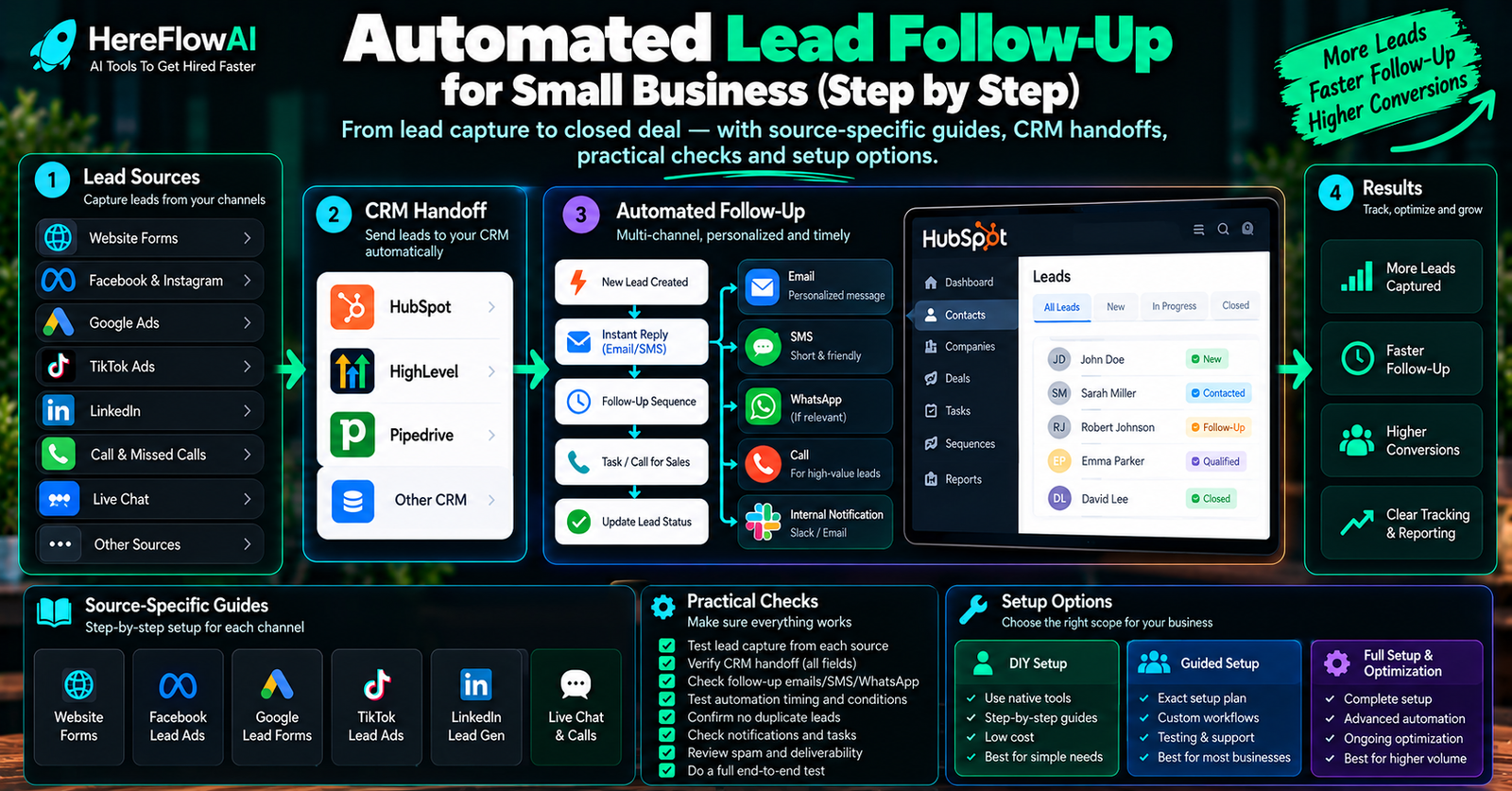

Quick answer: automated lead follow-up uses rules and connected tools to handle the first steps after an enquiry arrives. It can acknowledge the request, create or update a CRM record, assign an owner and trigger the next action. For a small business, start with one source, one destination and a clear human handoff.
The important part is not the tool. It is the handoff. Small businesses often already have forms, inboxes, CRMs and calendars. The problem is that those systems do not always move information between each other at the right moment.
A good first automation fixes one clear break in that chain instead of trying to automate the whole sales process at once.
Choose the right guide for your lead source
This page explains the whole first handoff. Use the specialist guide for the system or decision you need next.
| Your next task | Guide to use | What it covers |
|---|---|---|
| Choose which steps to automate | Automated vs manual follow-up | Approved messages, human judgement and stop conditions |
| Organize what happens inside your CRM | CRM lead follow-up workflows | Contact records, new enquiries, ownership and repeat submissions |
| Connect an Elementor website form | Elementor to HubSpot integration | Website-form setup, field mapping and connection tests |
| Collect Facebook Instant Form enquiries | Facebook Lead Ads to HubSpot | Page access, sync delays and missing-lead checks |
| Have one compatible workflow implemented | $149 Lead Follow-Up Starter | One source, one destination and a defined first handoff |
What is lead follow-up automation?
Lead follow-up automation uses rules and connected tools to make sure each new lead gets the same essential first response and is placed where a person can continue the conversation.
- A visitor submits a website form.
- The system sends an approved acknowledgement email.
- The lead is added to HubSpot, GoHighLevel, Airtable or Google Sheets.
- The owner or sales person receives an alert.
- The lead is assigned a status or owner.
- A human takes over when judgement is needed.
You do not need an autonomous AI agent for every first automation.
The parts of a lead follow-up workflow
The lead source receives the enquiry: for example, an Elementor form or a Facebook Instant Form. The destination stores the contact and its request, usually in a CRM or a structured spreadsheet. The trigger starts the agreed actions when the submission becomes available. The owner is the person responsible for the next conversation.
A contact and an enquiry are different things. The same person may submit a second legitimate request. Keep that new request visible while avoiding a second contact record or a second email caused by a repeated delivery of the same event. The CRM workflow guide explains the record and event rules.
Lead response automation covers the first handoff after an enquiry becomes available: record it, send the approved receipt when appropriate, assign responsibility and alert the owner. Ongoing follow-up covers the later tasks or messages. Define each stage separately so the team can test it and see where a request is waiting.
Also separate capture time, automation processing time and human response time. A connector must first deliver the submission before a downstream acknowledgement can run. The Facebook-to-HubSpot guide covers the published sync window for that source.
What should a small business automate first?
Start with steps that are repetitive, predictable and easy to test.
| Step | Automate? | Reason |
|---|---|---|
| Capture form submission | Usually yes | Structured event with clear fields |
| Send acknowledgement | Usually yes | The message can be approved in advance |
| Create CRM contact | Usually yes | Reduces duplicate entry |
| Assign basic owner | Often yes | Works when the rule is clear |
| Notify the team | Yes | Prevents leads from sitting unseen |
| Decide final price | Usually human | May depend on context and judgement |
| Handle unusual complaints | Human | Needs judgement and empathy |
The best first workflow: lead arrives → reply → store → alert
- Trigger: one new lead source such as a contact or booking form.
- Approved response: one short email explaining what happens next.
- Destination: one CRM or Google Sheets.
- Routing: one owner or one simple rule.
- Notification: email, Slack or another supported alert.
- Human handoff: a person takes over when judgement is needed.
Reference workflow: a service enquiry from a website
This is an implementation example to adapt and test, not a client result or a measured performance claim.
- A customer submits one approved website form with a contact address and a service request.
- The workflow checks the required fields and whether that submission was already handled.
- It creates or updates the contact and records the new enquiry using the agreed matching rule.
- It sends the approved receipt message when the address and communication rules permit it.
- It assigns the responsible person and sends the agreed notification.
- A person reviews the request, confirms availability and discusses the quote.
An acknowledgement confirms receipt. It does not establish that the customer has been qualified, that a booking exists or that a salesperson has replied.
Which tools can handle lead follow-up automation?
| Tool type | Best for | Watch out for |
|---|---|---|
| Native CRM automation | Workflows that stay inside one CRM | Limited when the process crosses apps |
| Zapier | Fast, straightforward app connections | Task costs can grow at volume |
| Make | Visual multi-step workflows and branching | Complex scenarios need maintenance |
| n8n | Custom logic, APIs and AI steps | More technical setup |
| Google Sheets | Simple source of truth for an early-stage business | Not a full CRM as complexity grows |
For a detailed comparison, read Zapier vs Make vs n8n for small business.
What should stay manual?
- Custom pricing or discounts
- Refunds or payment changes
- Sensitive complaints
- Legal or contractual commitments
- High-value qualification decisions
- Anything where the system may be uncertain and the consequence matters
For a broader framework, see AI automation for small business: rules, AI and human approval.
Lead follow-up automation checklist
- Define exactly what counts as a new lead.
- Choose one source to automate first.
- Choose one destination system.
- Write the approved acknowledgement message.
- Define who owns the lead.
- Define what happens if a field is missing.
- Test duplicate submissions.
- Test invalid contact data.
- Make failures visible.
- Document how a human takes over.
How to measure whether the handoff works
- Capture completeness: compare eligible source submissions with recorded CRM enquiries over the same period.
- Processing delay: record source submission, destination arrival and first-action timestamps separately.
- Ownership: count enquiries that still have no responsible person or next action.
- Exceptions: record failed actions, repeat event deliveries and invalid contact details.
- Sales outcome: track qualified conversations and booked work separately from sent acknowledgements.
Record a baseline before changing the process. Set response targets using the team’s actual capacity and the source’s documented delivery behavior.
Common mistakes
Automating too many lead sources at once
Different forms and channels often contain different fields. Start with one source, prove the mapping and then expand.
Sending messages before approval
The first response should match the business, its actual service area and its real promises.
Using the CRM as a dumping ground
Creating a contact is not enough. The workflow needs a clear owner, status and next action.
No failure visibility
Silent failure is worse than a manual process because the team assumes the system is working.
How much does lead follow-up automation cost?
Pricing depends on scope. A simple single-workflow implementation is much cheaper than a multi-channel system using SMS, WhatsApp, voice AI, several CRMs or custom APIs.
HereFlowAI’s $149 Starter Setup is intentionally narrow: one lead source, one CRM or Google Sheets destination, one approved instant email follow-up, basic routing/notification, testing and handover documentation.
HEREFLOWAI DONE-FOR-YOU SERVICE
Want the first lead handoff built for you?
The $149 Lead Follow-Up Automation Setup connects one lead source to one CRM or Google Sheets, sends an approved instant email follow-up, routes the lead, alerts the right person, tests the workflow and documents the handoff.
Before buying: confirm the source, destination, available subscriptions and required access fit the Starter. Software subscriptions, advertising spend, extra channels and ongoing maintenance are separate from the $149 implementation.
Related Lead Automation Guides
Frequently asked questions
Can lead follow-up automation work without AI?
Yes. Many of the best first automations are rule-based. AI is useful when the workflow has unstructured text or judgement, but it is not required for capture, routing, notifications and basic follow-up.
Can I use Google Sheets instead of a CRM?
For a simple early-stage workflow, yes. A structured Sheet can be enough to prove the process before moving to a full CRM.
Should the system send multiple follow-ups automatically?
Only after the first workflow is stable and the messages are approved. Start with one acknowledgement, then add timed follow-ups if needed.
What is the safest first automation?
New lead arrives, approved response goes out, record is created, and a human is alerted.