


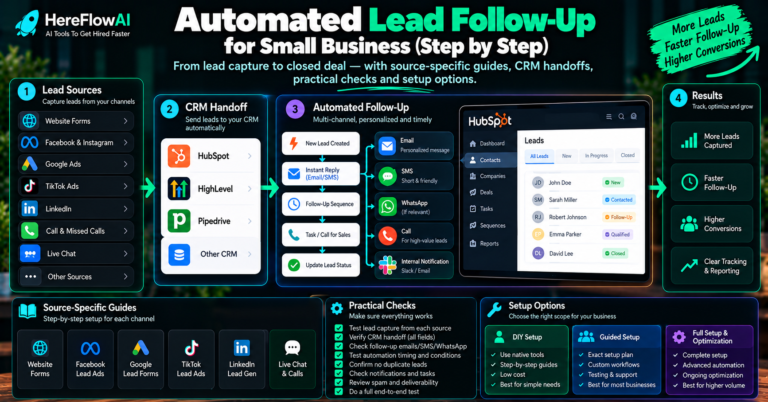
Quick answer: CRM lead follow-up automation turns a CRM from a contact database into an active workflow. The most useful automations create the lead, acknowledge it, assign ownership, trigger the next action, surface stale opportunities and keep the pipeline updated without relying on memory.
Many small businesses already pay for a CRM but still copy information manually, check inboxes for new enquiries and remember follow-ups in their heads. That is not a software problem. It is a workflow problem.
HEREFLOWAI DONE-FOR-YOU SERVICE
Want the first lead handoff built for you?
The $149 Lead Follow-Up Automation Setup connects one lead source to one CRM or Google Sheets, sends an approved instant email follow-up, routes the lead, alerts the right person, tests the workflow and documents the handoff.
What is CRM lead follow-up automation?
CRM lead follow-up automation uses triggers, rules and integrations to keep a lead moving after it enters the business.
The CRM should answer four questions: where did this lead come from, who owns it, what should happen next, and when does somebody need to intervene?
7 CRM lead follow-up workflows worth building
1. Create or update the contact automatically
When a form is submitted, create the CRM contact using the fields you trust. If the contact already exists, update it instead of creating duplicates.
2. Send an approved acknowledgement
Send a short message that confirms receipt and explains the next step. Do not promise a response time your team cannot meet.
3. Assign an owner
Use a simple rule: service type, territory, language, branch or one default owner.
4. Alert the right person
A CRM record nobody sees is still a missed lead. Trigger a notification when a lead arrives or has no owner.
5. Create the next task
Instead of expecting a person to remember, create the next follow-up task or reminder automatically.
6. Surface stale leads
If a lead has no activity after a defined period, flag it for review. Bring it back to the team’s attention before adding more automated messages.
7. Close the loop after booking or conversion
When the lead books, buys or is disqualified, update the status so follow-up rules stop.
Native CRM automation vs external workflow tools
| Approach | Use it when | Main advantage |
|---|---|---|
| CRM-native rules | The workflow stays inside the CRM | Fewer moving parts |
| Zapier | You need straightforward cross-app triggers | Fast setup and broad connectors |
| Make | You need visual multi-step logic | Flexible branching |
| n8n | You need APIs, custom logic or AI steps | Deep control and extensibility |
Use the CRM’s native automation first when it can solve the problem cleanly. Add an integration layer only when the workflow crosses systems.
What fields should every new lead carry?
- Name
- Email or phone
- Lead source
- Service or request type
- Owner
- Status
- Created date/time
- Next action or follow-up date
Example: simple CRM follow-up flow
| Event | Automation | Human responsibility |
|---|---|---|
| Form submitted | Create/update contact | None |
| Contact created | Send approved acknowledgement | Approve template beforehand |
| Service selected | Assign owner | Define routing rule |
| Owner assigned | Send team alert | Review and respond |
| No activity | Create stale-lead task | Decide whether to follow up |
| Lead books or closes | Update stage and stop sequence | Handle the relationship |
Where AI can help—and where it should stop
AI can help when the CRM receives unstructured information such as long form messages or emails. It may summarize, classify or draft a reply. But higher-impact decisions should use explicit human review.
The NIST AI Risk Management Framework is a useful reference for governance and human oversight.
Five signs your CRM needs follow-up automation
- New leads sit unassigned.
- The same contact is entered in more than one place.
- Follow-up depends on memory.
- Sales cannot explain why a lead is still open.
- The owner cannot tell which source produced the lead.
How to implement without breaking the pipeline
- Map the current lead flow.
- Choose one lead source.
- Choose one CRM pipeline or Sheet.
- Define required fields.
- Define the owner and first response.
- Build the automation in a test-safe way.
- Run normal, duplicate and missing-field tests.
- Document how the team takes over.
- Add more channels only after the first flow is stable.
Prefer to organize leads in Excel before adding automation? Our Lead Pipeline & Follow-Up CRM Spreadsheet is an editable $19 download for tracking prospects, follow-up dates and pipeline stages. It is a manual planning tool, not an automated CRM integration.
Start with a smaller build
You do not need all seven workflows on day one. HereFlowAI’s $149 Lead Follow-Up Automation Setup starts with the first handoff: one lead source, one CRM or Google Sheets destination, one approved instant email follow-up, basic routing/notification, testing and documentation.
HEREFLOWAI DONE-FOR-YOU SERVICE
Want the first lead handoff built for you?
The $149 Lead Follow-Up Automation Setup connects one lead source to one CRM or Google Sheets, sends an approved instant email follow-up, routes the lead, alerts the right person, tests the workflow and documents the handoff.
Related Lead Automation Guides
Frequently asked questions
Can I automate follow-up inside HubSpot or GoHighLevel without n8n?
Often yes. If the workflow stays inside the CRM, native automation may be the simpler solution.
Can automation create duplicate CRM contacts?
Yes if the workflow is poorly designed. Use a reliable unique identifier and test duplicate submissions before launch.
What happens when the automation fails?
The system should expose the failure through logs, alerts or a fallback task. Silent failure should never be the default.
Do I need AI for CRM follow-up automation?
No. Rule-based automation handles many high-value CRM tasks more reliably.


[…] For what happens after a call, read our published small business lead follow-up automation guide and CRM follow-up automation guide. […]
[…] should also lead somewhere useful. See our Small Business Lead Follow-Up Automation guide and CRM Lead Follow-Up Automation guide for the next steps after a […]
[…] conversion workflows after a lead reaches the CRM, read our CRM lead follow-up automation guide and lead follow-up processes for small […]
[…] actually begins earlier in the process—such as form capture, CRM ownership or lead routing—our CRM Lead Follow-Up Automation guide helps distinguish those […]
[…] If the form contains an unusual request, the workflow should preserve the message and assign a review task. It should not invent an answer. If the same submission is delivered twice, the system should recognize it before sending a second acknowledgement. The CRM guide covers enquiry and duplicate-event handling. […]
[…] conversion workflows after a lead reaches the CRM, read our CRM lead follow-up automation guide and lead follow-up processes for small […]
[…] CRM lead follow-up workflows […]