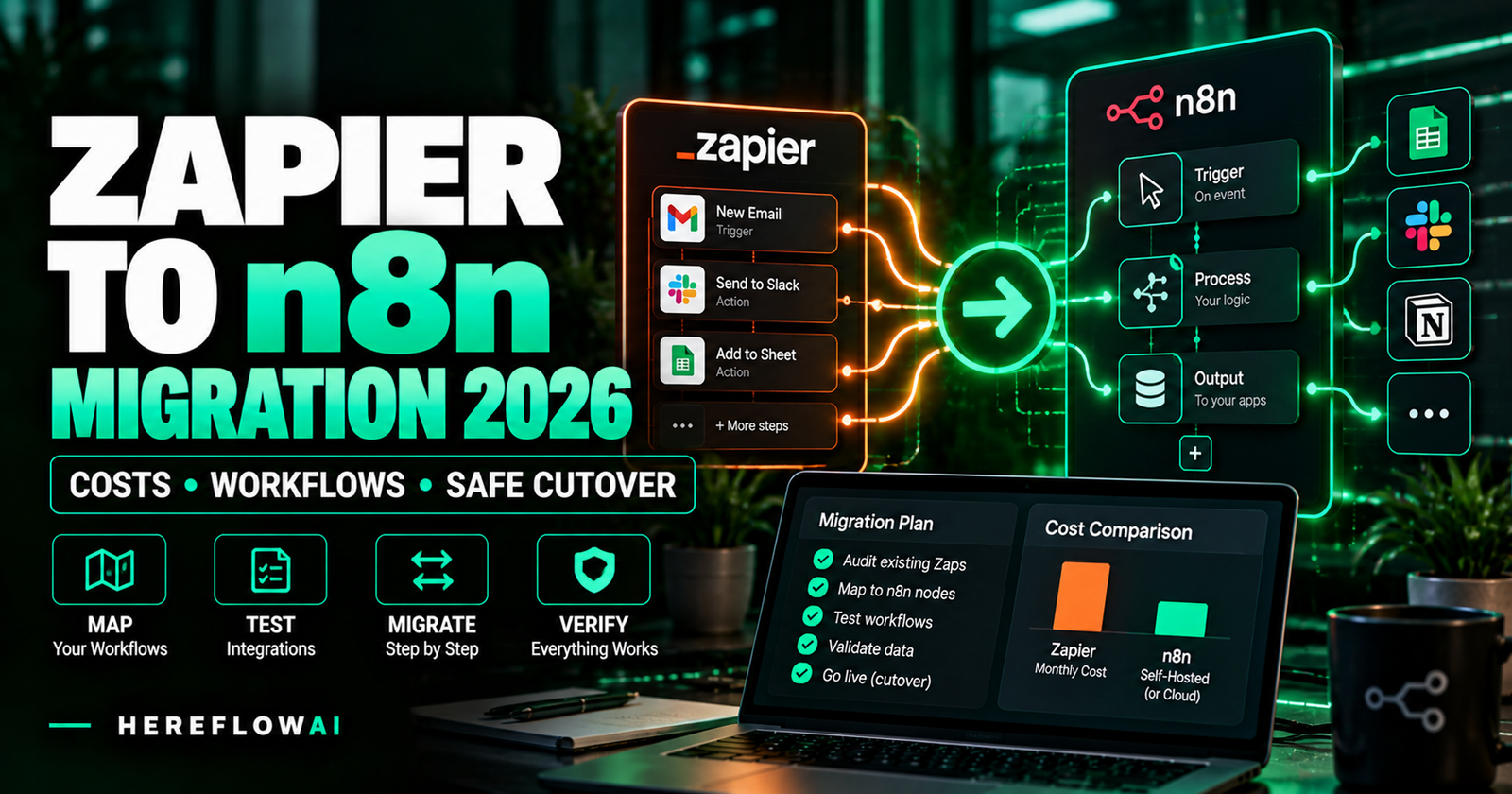

Research updated October 18, 2026. Considering a Zapier to n8n migration service? The best time to move is when you can identify which Zaps cost the most, confirm every critical app action has an n8n replacement, and run a controlled cutover without sending duplicate invoices, emails or CRM updates. Paying for a full rebuild just because n8n’s entry-level pricing looks lower is a poor starting point.
Quick verdict: Start with a Zap inventory and cost model, migrate only one high-value, well-understood Zap first, and run safe comparison tests before redirecting live events. Zapier currently bills by a task-based model in which different action types can have different task rates; n8n Cloud prices by workflow executions with unlimited steps within each execution. These units cannot be compared by simply dividing the advertised subscription prices. Some small teams should stay on Zapier; others can benefit from a partial or complete migration. Zapier task rates · n8n pricing.
This guide includes a 2026 price comparison, an example task-to-execution calculation, migration-service price examples from publicly advertised offers, a twelve-step cutover checklist, a copy-ready scope for freelancers, and clear warnings about Zapier export formats, credentials, API integrations and self-hosting.
MIGRATE ONLY WHAT IS WORTH MOVING
Get a quote for the actual Zaps, not a vague “automation migration.”
Inventory the triggers, steps, app connections, monthly task usage and expected outputs. Then give every candidate the same test and rollback requirements.
Zapier vs n8n cost in 2026: understand the billing units
Zapier’s official pricing starts at $19.99/month for Professional billed annually, while its Free plan includes 100 tasks per month. The current n8n pricing page lists Starter at €20/month billed annually with 2,500 executions and Pro at €50/month billed annually with 10,000 executions. Prices are shown in each vendor’s displayed currency and billing condition; they are not a direct exchange-rate-adjusted saving comparison. Subscription price depends on your volume tier, region, term and options. Zapier plans · n8n plans.
| Factor | Zapier | n8n Cloud |
|---|---|---|
| Billing unit | Tasks for successful steps; task rates differ for some action/AI tools | Workflow executions, not the number of nodes in a single workflow |
| Public entry paid plan | $19.99/month, annual billing, Professional starts here | €20/month, annual billing, Starter 2,500 executions |
| Second listed paid example | Team starts at $69/month, annual billing | Pro €50/month, annual billing, 10,000 executions |
| Use of workflow steps | Most successful app action steps count; built-in tools such as Filters/Paths/Formatter use 0 tasks | A single workflow execution can include many nodes without a per-node execution bill |
| Other cost risks | Tier/overage rules, specialized action or AI rates | Plan execution/concurrency limits; connected AI/API and implementation charges |
| Self-hosting | Zapier is hosted as a service | Optional free n8n Community edition; you operate server, backups, security, upgrades and uptime |
Verify features, quotas and usage rates on the linked official pages before you decide. n8n says Community edition is free for self-hosted use without a paid license key, although paid editions have more features; infrastructure and technical administration are not free. n8n Community vs paid editions.
Example: 1,000 new leads processed per month
Assume each incoming lead passes through a simple Zap containing three successful standard billed app actions: create/update CRM contact, send an approved email, and create a team task. Assume no AI premium tool calls, no specialized rate multipliers, and no extra paid actions. If each lead launches exactly one n8n workflow that performs the same three operations, here is the unit math:
| Usage model | Calculation | Illustrative volume |
|---|---|---|
| Zapier standard action steps | 1,000 events × 3 successful standard paid actions | 3,000 tasks |
| n8n single-workflow approach | 1,000 events × 1 completed workflow run | 1,000 executions |
These are units, not dollars or a guaranteed billing outcome. Zapier’s official task-rate guide now describes special pricing for some Lead Router, model tiers, code/extended runtime and MCP calls, while Filters, Formatter, Paths and various other built-in tools count as zero tasks. n8n sub-workflows and architectural choices can also increase execution usage. Check your real usage log before projecting a monthly bill.
For a business already comfortably inside Zapier’s cheapest tier, switching solely for the difference between 3,000 task units and 1,000 execution units may not pay for itself after migration and support costs.
Zapier to n8n migration service pricing: real vendor examples
Migrations are sold at dramatically different price points because a single three-step Zap is not a 25-Zap production estate. These are individual advertised prices, not a validated marketplace average or a claim that every vendor is available or reliable.
| Public listing | Advertised price | What price appears to cover |
|---|---|---|
| Fiverr: Flowmigrator | $60 Basic; $350 Standard; $850 Premium | Tiered freelancer migration offers; confirm workflows, integrations and support |
| Logic Workflow | $97 per workflow | Vendor advertises a fixed-price migration service |
| Kodeit | From $800 | Custom quoted migration after scoping |
| FlowPorter | From $9,500 for a defined up-to-10-Zap package | More complex, enterprise-style workflow estate migration, with formal scope verification |
These listings show the range of scopes being sold, not a universal expected cost. Compare the actual requirements (number of Zaps, workflows, branches, external APIs, testing, cutover, support) and request a firm quote. An advertised “all complexity included” claim should be tested against the provider’s exclusions and contract before purchasing.
Should you stay with Zapier, optimize it or move?
| Current situation | Likely best first step | Reason |
|---|---|---|
| Two simple, stable, low-task Zaps | Stay with Zapier | Migration, maintenance and learning effort may exceed any subscription difference |
| High task count from avoidable steps | Optimize current Zaps | Fix redundant actions/duplicate triggers before paying for migration |
| Expensive, repeatable multi-step Zaps | Pilot n8n migration | Measurable usage difference could justify a scoped rebuild |
| Critical custom app not available in n8n | Check API/connector first | Unsupported triggers or auth may make migration impractical |
| Teams requiring compliance, uptime and complex access controls | Architecture and security assessment | Plan features, self-hosting risk and operations often dominate sticker price |
For the broader software comparison, see Zapier vs Make vs n8n for small business. This article answers a different buying question: what will it take to migrate the workflows you already operate?
How to migrate Zapier workflows to n8n: a 12-step buyer checklist
- Inventory every active Zap. Record name, owner, trigger, app actions, Paths, Filters, Formatter, Code, webhooks, connected systems and business purpose. Tag each as keep, retire, improve or migrate.
- Download real usage history. Record 30–90 days of monthly tasks, failure rates and relevant peaks. Zapier’s history export guide describes exporting up to 5,000 selected runs at a time.
- Export reference material. On supported plans, Zapier can export Zap JSON, but Zapier JSON is not directly compatible with n8n’s workflow JSON importer. Treat it as a build reference. Account-data exports can also include Zap definitions. Zapier JSON export instructions.
- Choose the destination environment. Evaluate n8n Cloud versus Community self-hosting using staffing, monitoring, control, security and costs. Choose a deployment you can operate.
- Map each Zap step to n8n. Rebuild triggers, actions, conditions, branches, data transformations, loops and notifications using supported nodes or documented API requests. Confirm special app behavior and licensing.
- Recreate credentials safely. Reauthorize source and destination systems using platform access controls, OAuth or secure credential management. Do not email API secrets to a developer.
- Define identity and idempotency. Specify stable record IDs for Contacts, orders, emails, payments and other side effects. Two executions must not silently create the same object twice.
- Build in a non-production environment. Connect to staging or isolated sandbox endpoints. Avoid triggering real invoices, emails, stock changes or messages during validation.
- Add error handling. Log failed nodes and trigger notifications with a responsible human owner. A “green” run does not prove the business destination is correct.
- Run parallel comparison tests safely. Use the same sanitized example inputs against both systems, but isolate any side-effecting actions. Real parallel duplicate sends are not a valid test technique.
- Cut over one Zap at a time. Confirm a production-ready n8n endpoint is registered, change the external source to trigger only the new workflow where possible, disable the old Zap, and verify one live, low-risk event. Maintain a rollback method.
- Hand over and monitor. Deliver editable workflows, connection ownership, alert contacts, run logs, change notes, and a stabilization window; downgrade or cancel Zapier only when all remaining needs are accounted for.
n8n’s official export/import guidance describes n8n-native JSON. It explicitly warns that exported n8n files can contain credential names/IDs and potentially sensitive HTTP headers. There is no documented built-in feature in that importer for turning Zapier’s native JSON export into tested n8n workflows. Treat “one-click Zap import” marketing claims as a separate product that requires independent validation.
Zapier step-to-n8n workflow mapping examples
| Typical Zapier step | Possible n8n equivalent | What must be tested |
|---|---|---|
| Trigger: new form submission | Native app Trigger, Webhook or polling schedule | Authentication, timing, production endpoint, duplicate triggers |
| Filter by Zapier | IF node / filtering expression | True and false paths, missing values |
| Paths | Switch or branched IF logic | Branch order and multiple possible matches |
| Formatter / parsing | Edit Fields, Date & Time or Code node | Null input, locale, timezone, date conversion |
| Create/update CRM contact | HubSpot/Salesforce node or API call | Deduplication and unchanged record IDs |
| Webhooks / custom API request | Webhook / HTTP Request nodes | Headers, secret storage, 429 retries and error alerts |
These are planning equivalents, not a promise of identical behavior. Verify authentication, throttling, polling latency, multi-step output, trigger reliability and any unsupported app feature before deciding the project is complete.
How to test without sending duplicate emails, invoices or CRM records
“Run both in parallel” is not permission to create two live side effects. For a shadow comparison, one path should be non-writing (such as logging expected output to a controlled testing destination). If both tools receive the same real lead and independently email the customer, the test has failed its basic risk requirements.
| Acceptance test | Required proof | Common failure |
|---|---|---|
| One new event | Same approved destination record as original Zap | Mis-mapped fields or missing output |
| Repeated event ID | No unintended duplicate action | Duplicate email/payment/record |
| Failed external API | Controlled retry or alert according to specification | Silent lost lead |
| Date/time/branch logic | Matching edge-case results for nulls and timezones | Wrong routing or schedule |
| Production cutover | Exactly one system owns each external action; rollback documented | Both systems active and writing to live data |
The migration should not be signed off simply because every n8n node shows green. Compare observable business outcomes, permissions, reliable alerts, true execution cost and a rollback path.
Migration break-even: when will a paid rebuild make financial sense?
The calculation should include one-time migration cost, ongoing n8n subscription or hosting, extra external API subscriptions, and ongoing administration/support, compared against the actual Zapier bill you can eliminate.
For a hypothetical example—not sourced vendor pricing—assume a $350 fixed migration fee and $50/month net operating cost reduction after adding the new platform and support expenses.
Estimated simple payback = $350 ÷ $50/month = 7 months
This ignores financing and changing usage. If monthly net savings are zero or negative, the migration does not pay for itself from subscription savings. If the migration solves an actual operational requirement, evaluate that benefit separately rather than making up a dollar ROI. Use 90 days of real bills or execution history, not just one vendor’s marketing calculator.
Should you self-host n8n on Hostinger VPS?
Possibly, if the client already has a team who can secure, back up, monitor and upgrade a public server. A VPS, including a Hostinger VPS, is hosting infrastructure, not a ready-to-run managed n8n migration service. You need a secure n8n deployment, reverse proxy, DNS, certificates, persistence, encryption-key management, alerts and a recovery process.
n8n’s official Docker deployment documentation cautions that self-hosting demands technical administration and recommends n8n Cloud when a team lacks the experience to operate servers safely. The Community edition can be installed free, but that does not remove your infrastructure bill or labor cost.
If your migration requirements truly justify self-hosting, consult our n8n Hosting comparison, Hostinger VPS Pricing guide and Hostinger discount guide for a separate hosting decision. Those links may lead to referral offers disclosed on the relevant page. Do not choose a VPS just because an unrelated Zap was slow or broken.
Copy this brief to compare Zapier-to-n8n specialists
We want a scoped Zapier → n8n migration, not an unpriced platform rewrite. We currently run [X active Zaps] with [Y tasks/month] on [Zapier plan]. These Zaps use [source apps], [destination apps], [Paths/Filters/Code/API steps] and [external webhooks]. We want to migrate [specific workflows] to [n8n Cloud/self-hosted]. Please quote the audit, mapping, secure reconnection, implementation, safe parallel comparison, idempotency/duplicate controls, error notifications, controlled cutover, rollback, documentation and post-launch support as separate deliverables. Do not activate two production flows that write to the same customer/payment systems. State all software costs and exclusions before we approve the project. We can supply sanitized diagrams and usage records initially; no passwords or API keys over chat/email.
Ask vendors how they will recreate unsupported Zapier-only features, what they will do if APIs lack the same actions, who owns credentials, and which party remains responsible after the stabilization period. A low quote without cutover planning, data protection or a tested rollback is not necessarily a bargain.
SPECIALIST IMPLEMENTATION • AFFILIATE MARKETPLACE
Compare Zapier → n8n Migration Experts on Fiverr
Use the brief above and compare providers by documented workflow mapping, real testing, cutover safety and handover—not just the headline price.
Find Migration Specialists on Fiverr →
Affiliate disclosure: HereFlowAI may receive an eligible referral commission from Fiverr Marketplace purchases. We have not independently vetted each specialist, and listings can change. Search for “Zapier to n8n migration” and request written scope and acceptance tests.
What does HereFlowAI’s $49 AI Automation Audit include?
Our $49 AI Automation Audit reviews one important business workflow and provides three prioritized automation opportunities, one process blueprint, suggested tools, human approval checkpoints and an implementation path. It can help you evaluate one Zap as a candidate for migration; it does not assess a whole Zapier estate, migrate your account, build n8n workflows, pay for subscriptions or maintain production systems.
The separate $149 Lead Follow-Up Automation Starter implements one supported lead-source-to-destination workflow with approved email, simple routing and handover. It is not an open-ended Zapier-to-n8n migration package, and cross-platform migrations must be quoted and approved as separate work.
For choosing a freelancer’s general technical capability, review Hire an n8n Expert and Hire a Zapier Consultant. These pages complement this migration-specific acceptance checklist.
Zapier to n8n migration FAQs
Can I automatically import my Zapier JSON into n8n?
Not through n8n’s documented native workflow JSON import. Zapier and n8n maintain different JSON formats. Zapier provides account and supported-plan Zap exports; these help document what to rebuild but are not a drop-in n8n workflow. Any third-party automatic conversion product requires real testing and credential reauthorization.
How much does migration from Zapier to n8n cost?
It depends on number and complexity of Zaps. Public examples reviewed here range from one Fiverr seller listing a $60 starting package through boutique implementation quotes from $800 to multi-Zap enterprise packages starting around $9,500. These are individual listings—not guaranteed market rates or comparable service scopes.
Will n8n always be cheaper than Zapier?
No. n8n Cloud and Zapier have different usage models, prices and feature/seat requirements. Self-hosted Community edition has server and maintenance costs even without a software license fee. Use real activity and the entire first-year bill.
Can I keep Zapier running during migration?
Yes, but for workflows that send email, write CRM records, charge payments or change inventory, do not allow both systems to execute the same live side effects. Use isolated/sandbox shadow tests and a deliberate switchover with a rollback plan.
Do Zapier connections and passwords transfer to n8n?
No automatic credential transfer should be assumed. Reconnect each destination using secure supported authorization. Never share passwords or API keys inside public workflow exports or email messages.
When should I keep Zapier instead of moving?
Often when your Zaps are few, reliable and inexpensive, your integrations are only supported in Zapier, or nobody is prepared to maintain n8n. An optimization and usage review can be a better first purchase than migration.
Can Hostinger VPS run n8n?
A suitably configured VPS can host n8n, subject to server resources, software configuration and security. Hostinger sells hosting, not guaranteed migration or ongoing operation. For nontechnical teams, managed n8n Cloud may reduce operational risks.
Does n8n count each node as a new execution?
n8n Cloud bills based on workflow executions, not each node within a run. Architectures with separate workflows, triggers and subworkflow calls must still be modeled accurately for actual usage. Compare this with Zapier’s published task rates, which vary by action type.
Final recommendation: migrate one proved winner before the rest
The strongest candidate is a high-volume Zap with well-understood inputs, meaningful Zapier task consumption, good API equivalence in n8n and manageable risk. Inventory, model cost, rebuild in a controlled environment, prove the outputs, cut over safely and monitor. Repeat only after the first migration produces the intended results.
Use the quote brief above and prioritize deliverables over marketing promises. If the business logic is unclear, plan one workflow before asking anyone to rewrite a whole system.
Sources, editorial disclosure and method
Primary sources reviewed October 18, 2026: Zapier current pricing, Zapier task rate guide, n8n published plans, n8n Community Edition, n8n workflow import/export documentation, Zapier workflow export, Zapier Zap-history export, and n8n self-hosting prerequisites. Marketplace examples come from individually linked offers; they are not statistical averages or firsthand vendor tests. Pricing, feature availability and exchange rates can change, and no savings, ranking or commission is guaranteed. Affiliate and paid HereFlowAI product relationships are disclosed where relevant.