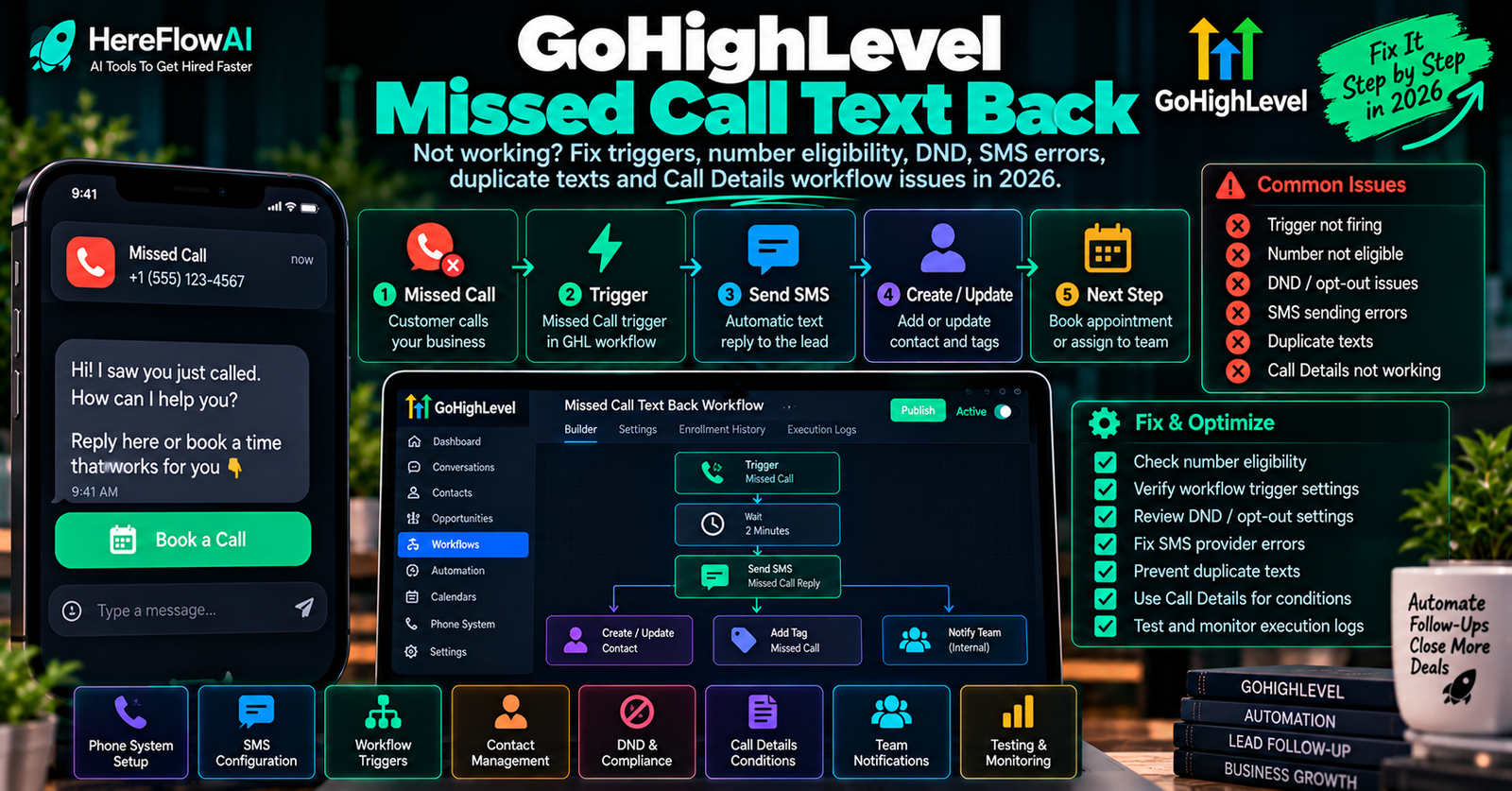

Updated October 18, 2026. Is GoHighLevel Missed Call Text Back not working? Before rebuilding your automation, work out which of three things failed: (1) the incoming call was not classified as missed, (2) no SMS attempt was created, or (3) the SMS was attempted but not delivered. Each problem has a different fix.
Fast answer: In the correct HighLevel sub-account go to Settings → Phone System → Voice, open Voicemail & Missed Call TextBack, enable Missed Call Text Back, customize the text, use the test-message control, and save. Check your inbound call timeout and the real call status. If a message was attempted but failed, inspect Conversations for the precise error and then verify the sending number, opt-out/DND status and relevant SMS registration/compliance. HighLevel updated its built-in feature in September 2026 to select an eligible alternate sender when necessary. Official HighLevel setup guide.
This is a focused troubleshooting and buyer’s checklist, not an article about general GoHighLevel account setup. If you need a complete CRM or funnel implementation, use our separate GoHighLevel Setup Service guide.
FIX THE RIGHT LAYER
Missed call → trigger → eligible SMS number → delivered message
Don’t pay a freelancer for a new workflow before you can identify where this sequence breaks. Use the 10-minute checks below.
GoHighLevel missed call text back not working: 10-minute checklist
- Choose the correct location. Switch into the intended HighLevel sub-account. Each location has its own phone settings, sending number and contact data.
- Enable and save the built-in feature. Go to Settings → Phone System → Voice, find Missed Call Text Back, turn it on, configure a plain test message, and save. An edited but unsaved message is not a live setting.
- Run a message test. Use the built-in send-test control. A successful test shows that the selected sender can send to your test destination, but does not prove that an incoming missed call will trigger the feature.
- Call the business number from a different phone. Allow it to ring past the incoming-call timeout. Check whether the call is truly recorded as missed. An answered call will not trigger the built-in text back.
- Check the contact conversation. Search the test caller in Conversations. Is there an outgoing SMS? Is it unsuccessful, or is there no attempt?
- Investigate the correct branch. No attempt → review toggle, number routing, call result and duplicate workflows. Attempt failed → inspect the red error indicator, sender eligibility, restrictions, compliance and contact DND.
The official configuration guide recommends an incoming timeout in the 10–20 second range for typical use cases. Your team should still choose a timeout appropriate to real phone handling rather than treating a universal value as correct.
What the observed symptom usually means
| Symptom | Investigate first | Evidence to collect |
|---|---|---|
| No SMS attempt appears | Built-in feature enabled/saved; inbound call result; location routing | Call time, call status, number, screenshot of settings |
| Test SMS works, missed call does not | Incoming timeout, forwarding/voicemail/call connect, wrong location | Controlled missed call and call log |
| SMS attempt marked failed | Exact error code, number eligibility, A2P/toll-free verification, destination | Red failure detail in Conversations |
| Only one contact fails | SMS DND/opt-out, invalid contact number, recipient route | Contact status + message code |
| Two or more texts arrive | Repeated missed calls; built-in text back plus overlapping workflow | Call timestamps and each SMS/workflow execution |
| Custom workflow never fires | Published state, Call Details filters, re-entry rules and logs | Enrollment history, contact ID and call disposition |
These are diagnostic leads, not statements that your own account has a specific fault. Collect evidence before changing live routing or sender registration.
Fix #1: enable Missed Call Text Back in the right HighLevel menu
HighLevel’s September 2026 guide places the built-in feature under Settings → Phone System → Voice and the Voicemail & Missed Call TextBack area. Activate the toggle, use a short approved message, send yourself a test and save the configuration. Some older documentation shows it under Business Profile; the newer Phone System guide is the better reference for the current interface.
Suggested non-promotional acknowledgement text, adapted for your own compliance review:
Hi, this is [Business]. Sorry we missed your call. Reply with what you need and our team will follow up. Reply STOP to opt out.
Use appropriate business identification, opt-out language and recipient permissions for your market. Don’t copy customer phone numbers into a test automation that would message people who did not expect to hear from you.
Fix #2: check incoming call status, ring timeout and forwarding
The built-in feature reacts to an unanswered incoming call after the relevant ring timeout. If a forwarded call is taken by a personal voicemail or another device, the phone system may consider the interaction answered rather than missed. Examine the actual call log and forwarding behavior rather than guessing from what the caller heard.
HighLevel’s phone number configuration documentation describes Call Connect, a confirmation mechanism that can help distinguish a human who accepted a forwarded call from a voicemail that picked it up. This can matter to call status tracking and missed-call automations. Don’t enable complex call-routing changes on your only live business line without first testing in a safe time window and providing a rollback.
If you forward a number to an employee, test all three cases: employee answers, employee declines and forwarded voicemail answers. Compare the call log results; the best fix depends on which status HighLevel actually records.
Fix #3: check SMS-capable numbers and HighLevel’s smarter sender selection
HighLevel now documents fallback selection if the originally called number cannot send SMS. Its published priority order is: (1) the inbound number if SMS-eligible; (2) a number that previously messaged this contact successfully; (3) the account’s default outbound number; (4) another eligible location messaging number.
Important: This helps only if an eligible sending number exists. It does not override DND, recipient restrictions, registration requirements or carrier blocks. It can also mean the customer sees a text from a different business number than the one they dialed.
For a failed outbound SMS, open the exact contact in Conversations and inspect the numeric error. HighLevel’s LC Phone error code dictionary includes examples such as 21606 for an invalid/non-message-capable sender and 30035 for a US A2P 10DLC number still being configured. Fix the stated cause; don’t rotate numbers simply to bypass restrictions.
Fix #4: troubleshoot A2P, toll-free verification, DND and delivery failures
For US business texting, sender registration and toll-free verification requirements may apply depending on the number and route. A paid phone number or functioning voice line is not proof that outbound business SMS has completed its required setup. The destination country, format and opt-in rules also matter.
Check the message error in Conversations. HighLevel’s SMS delivery error troubleshooting lists common codes and remedies. Its LC Phone messaging policy covers communication preferences, DND, contact restrictions, messaging ramp and sending safeguards. Do not remove a customer’s opt-out or DND flag merely to force a test through.
Messaging restrictions are not all the same. HighLevel’s September 2026 quality-monitoring article says some restrictions affect bulk/workflow actions while missed-call text back can still operate; its general policy describes daily usage limits and restrictions that can affect multiple message types. Therefore don’t assume either “all sending is blocked” or “missed-call SMS is always exempt”: inspect the restriction type, sending status and exact error for your account.
Fix #5: built-in feature vs Call Details workflow—avoid duplicate texting
The built-in Missed Call Text Back setting is a simple responder. HighLevel explicitly says it can send another SMS for every separate missed call, even when the same caller retries immediately. That is not necessarily a software bug. If you also built a custom workflow that sends an SMS on a missed call, the same event may produce another message.
For advanced handling, HighLevel’s Call Details workflow trigger can filter by Call Direction = Incoming and relevant Call Status values such as busy, voicemail or no-answer, with optional phone-number or Number Pool filters. You can then define an internal task, owner notification or a carefully controlled single SMS flow.
Practical decision: Use either the built-in SMS responder or a deliberately designed custom SMS workflow as the primary texting route for that call scenario. Don’t leave overlapping senders active without a tested reason. If you choose a cooldown to avoid repeat messages, test the behavior with a harmless repeated call and make sure a genuinely urgent callback is still noticed by a human.
HighLevel also notes that workflow Allow Re-entry settings and already-active contacts control whether a second call actually enrolls again. A workflow still in Draft does not process live calls. Review its Enrollment History and Execution Logs to see whether enrollment failed or a Send SMS action failed after enrollment. Those are different problems.
Seven acceptance tests before switching on missed-call follow-up
| Test | Expected evidence |
|---|---|
| 1. Answered inbound call | No built-in missed-call SMS after a genuinely answered call |
| 2. Unanswered inbound call | Missed call logged; one expected SMS attempt under agreed setup |
| 3. Repeat caller within minutes | Built-in behavior or custom cooldown matches deliberate policy; no unplanned double-SMS |
| 4. DND / opted-out contact | Opt-out respected and no unwanted SMS sent |
| 5. Original inbound number cannot send SMS | Eligible fallback sender selected, or failure reason shown if none exists |
| 6. Custom Call Details workflow | Correct incoming status, matching filters, published trigger and documented execution history |
| 7. Team handoff | Assigned human sees the caller’s request, callback task and clear next action |
Use your own permitted test numbers and realistic call routes. Don’t trigger automated marketing messages to unrelated numbers merely to make a test pass. If a test involves a real customer message, verify lawful consent and opt-out handling first.
How much does a GoHighLevel missed call text back fix cost?
A simple toggle, corrected routing setting or blocked contact can sometimes be resolved by the business owner with the official documentation and no external consultant. Other cases—complex LC Phone/Twilio migrations, faulty Call Details workflows, multiple lines, or an integration creating duplicate SMS—need a more carefully scoped technical review.
There is no reliable universal freelancer repair price in the HighLevel documentation reviewed for this article. Treat any seller’s quote as a specific offer, not a confirmed market rate. Compare whether the quote covers diagnosis, sender/permissions checks, configuration, one business number, repeat-caller suppression, testing and documentation. Be wary of unlimited SMS or guaranteed delivery promises.
FIND A SPECIALIST • FIVERR AFFILIATE
Need someone to repair the missed-call workflow?
Compare GoHighLevel and LC Phone specialists. Search “GoHighLevel missed call text back” or “GHL LC Phone SMS troubleshooting” and require a fixed-scope repair with screenshots and controlled tests.
Compare GHL Troubleshooting Specialists on Fiverr →
Affiliate disclosure: HereFlowAI may receive a commission on eligible Fiverr Marketplace purchases. We have not independently vetted every specialist; review their terms, experience and delivery evidence before ordering.
Copy-ready brief for a GoHighLevel missed-call repair specialist
Our HighLevel sub-account uses [LC Phone/Twilio], business phone [redacted last digits], and [one/multiple] inbound line(s). Built-in Missed Call Text Back is [on/off]. The symptom is [no SMS attempt / failed message error / duplicate SMS / custom Call Details workflow not enrolling]. Calls are recorded as [call status]. We need diagnosis, the minimum safe correction, inspection of number eligibility and applicable compliance, testing of seven scenarios including repeated calls and DND, documentation, and a rollback plan. Please quote a fixed price for the agreed scope, list platform fees separately, and confirm how you will request temporary least-privilege access. We will not share passwords, API keys or customer contact lists in unsecured messages.
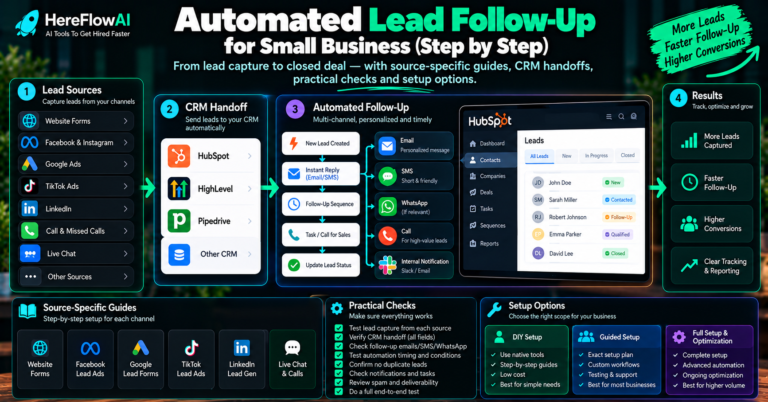
For wider CRM/funnel setup rather than one fault, see our GoHighLevel Setup Service buying guide. If an SMS problem actually begins earlier in the process—such as form capture, CRM ownership or lead routing—our CRM Lead Follow-Up Automation guide helps distinguish those stages.
Can HereFlowAI’s $49 Audit or $149 Starter repair this issue?
The $49 AI Automation Audit is a planning and prioritization service for one core workflow; it can help document the missed-call handoff and human approval points but does not include live GoHighLevel troubleshooting or SMS delivery repairs.
The $149 Lead Follow-Up Starter covers one supported lead source, one supported CRM/Google Sheets destination and approved email follow-up, notification and handover. It does not include an open-ended GHL phone system repair, SMS carrier troubleshooting, voice AI, messaging charges or custom API development. For an actual phone-system defect, seek a specialist’s scoped quote.
FAQ: GoHighLevel Missed Call Text Back troubleshooting
Where is Missed Call Text Back in GoHighLevel?
In the current official guide it is under Settings → Phone System → Voice, in the Voicemail & Missed Call TextBack area. Some earlier HighLevel articles place it under Business Profile; use the newer product interface and official help article.
Why is my GoHighLevel missed call text not sending?
First check that the incoming call was actually logged as missed, the feature is enabled and saved, and an SMS attempt exists. If the attempt is unsuccessful, inspect its specific error code plus sender eligibility, recipient DND/opt-out and applicable messaging restrictions. A successful manual SMS test does not prove the missed-call trigger fired.
Why does the same caller get multiple messages?
HighLevel’s built-in text back can fire for each missed call, even when they happen minutes apart. A separate Send SMS workflow may create more texts if it runs in parallel. Use a controlled custom workflow with cooldown or business rules when repetition must be restricted.
Can the missed-call SMS come from a different number?
Yes. HighLevel now checks other eligible sending numbers in a defined order if the original inbound number is not SMS-capable. If no eligible number is available, the attempt can fail with an explanation in Conversations.
Will text back send if a contact is marked DND?
No. HighLevel states that opt-out preferences and DND continue to be honored. Do not override a contact’s communication choice simply to make a sales message deliver.
Does Missed Call Text Back also send WhatsApp?
No. The built-in SMS feature and Missed Call WhatsApp Back are separate; WhatsApp needs its own approved setup and consent.
Will a custom workflow run after every missed call?
Not automatically. The Call Details trigger must match the incoming call’s recorded status; the workflow must be published, and the contact’s re-entry/active state must allow enrollment. Check execution and enrollment logs.
Is Hostinger needed to fix this?
No. Hostinger is website hosting infrastructure, not the LC Phone/Twilio sending system. Buying or switching WordPress hosting will not fix a blocked SMS sender, missed-call routing or HighLevel DND error. Choose hosting separately if you are also building a business site.
Does every attempted SMS cost money?
HighLevel states that Missed Call Text Back sends contribute to messaging usage. Actual billed usage and failed-message costs depend on the phone provider and current tariff. Check your live usage dashboard and provider terms rather than assuming text back is unlimited.
Bottom line: confirm the call first, the SMS second
For most troubleshooting, the fastest route is to establish whether the call was recognized as missed and whether the platform attempted an SMS. Then investigate sender eligibility, contact preferences and error details. Rebuild or hire only after the specific defect is documented. A “working” setup must pass the repeat-call, DND and delivery tests—not merely display an active toggle.
Sources and editorial policy
Official documentation reviewed October 18, 2026: HighLevel Missed Call Text Back setup and updated number selection (modified September 7, 2026), Call Details workflow trigger (modified September 4, 2026), phone configuration, SMS failure codes, LC Phone error dictionary, LC messaging policy, Messaging Quality Monitoring, and Missed Call WhatsApp Back. The article draws diagnostic hypotheses from vendor rules, not from access to any reader’s account. HereFlowAI does not claim to have tested each possible phone configuration and does not promise SMS delivery, sales, or repair success. Marketplace links are marked as affiliate links, and HereFlowAI paid service scopes are stated separately.