
Affiliate Disclosure: This article contains affiliate links. If you hire through one of these links, HereFlowAI may earn a commission at no extra cost to you. We recommend platforms based on project fit, not commission size.
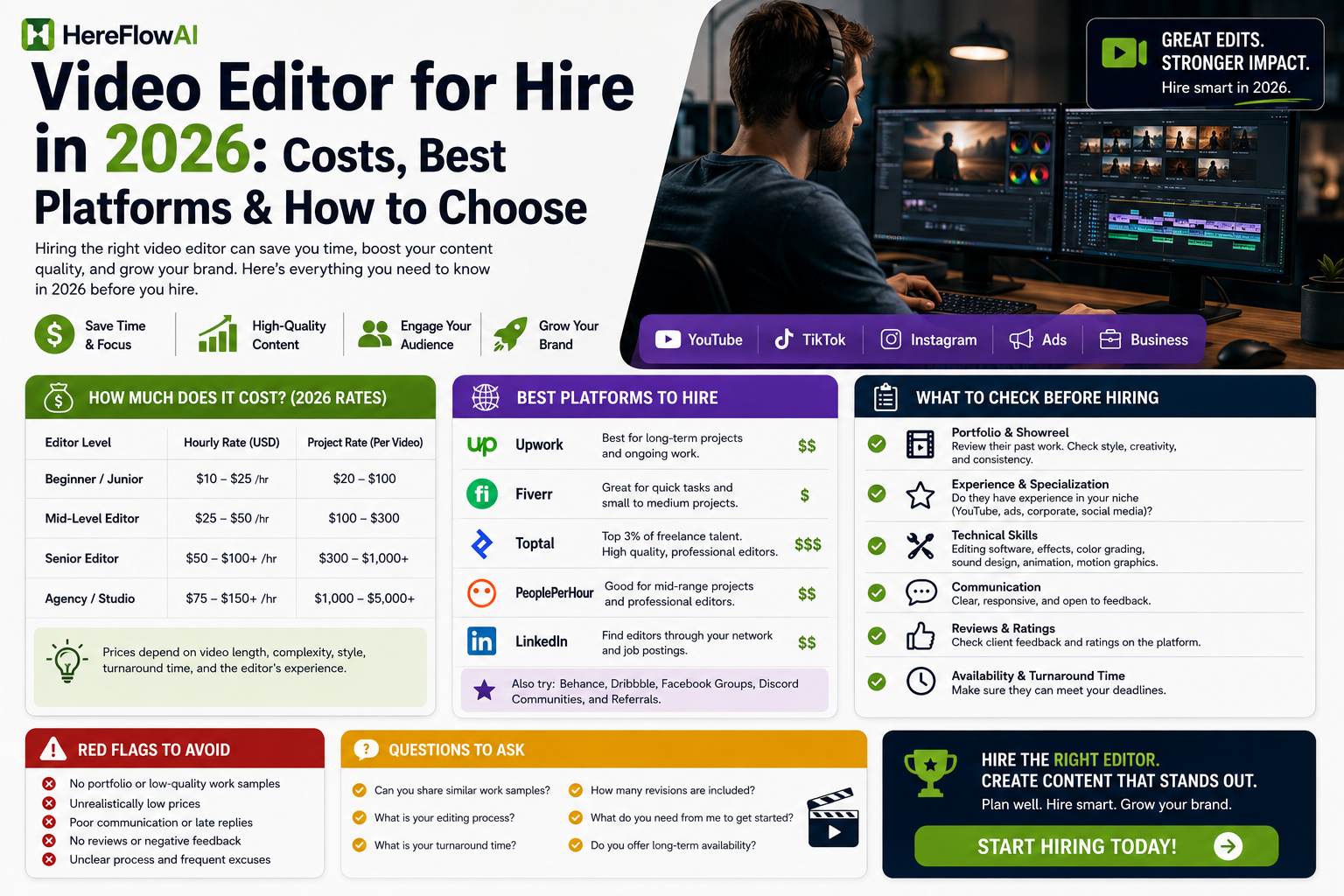
Upwork currently lists video-editing projects from roughly $200–$600 for short-form clip packages, $500–$1,500 for YouTube production, and $1,000–$3,000 for corporate or brand videos. Fiverr’s August 2026 cost guide, meanwhile, puts a basic editing project around $65 on average and says social-media editing can range roughly $10–$100 per finished minute.
Those numbers are not contradictory.
They describe completely different workloads.
A person cutting five Reels is not selling the same service as an editor handling a 20-minute YouTube video with B-roll, sound design and custom graphics.
💡 HereFlowAI Tip: When you hire a video editor, compare cost per approved finished video, not just hourly rate. The cheapest editor is not cheap if every project needs three extra revision rounds.
Table of Contents
How Much Does a Video Editor Cost in 2026?
The first mistake is asking:
“How much does a video editor charge?”
There is no useful answer until you define what they are editing.
Upwork’s current hiring data puts general video editors around $10–$60 per hour, depending on complexity and experience. Its project examples are more useful for buyers: a package of 3–5 short clips can run about $200–$600, a 10–20 minute YouTube production about $500–$1,500, and a polished 2–5 minute corporate video about $1,000–$3,000. Custom motion graphics or animation can run around $1,500–$5,000 per project.
Fiverr’s 2026 guide uses another pricing lens. It says basic video-editing projects average around $65 total, while social-media marketing video editing may be quoted at roughly $10–$100 per finished minute. It also notes that one finished minute can require 1–2 hours of editing or more, depending on complexity.
That last point matters.
A 60-second Reel does not necessarily mean 60 seconds of work.
The editor may need to:
- review raw footage
- select usable clips
- tighten pacing
- clean audio
- add captions
- source B-roll
- add music
- color-correct footage
- build motion graphics
- export different aspect ratios
- revise the final cut
So do not compare quotes by final video length alone.
Compare the finished deliverable
If Editor A charges $40/hour but needs ten hours and Editor B charges a fixed $300 and delivers exactly what you need, the hourly rate tells you very little.
Ask for:
Price per approved final video.
Then define what “approved” includes:
- number of revisions
- video length
- raw-footage limit
- captions
- B-roll
- graphics
- music
- thumbnail
- source files
- delivery time
| Editing need | 2026 pricing signal | What usually changes the price | Best way to compare quotes |
|---|---|---|---|
| Basic editing | Fiverr's August 2026 cost guide says a basic video editing job averages about $65 total. | Raw-footage length, number of cuts, captions, turnaround | Fixed price per approved video |
| Social media / short-form | Fiverr cites roughly $10–$100 per finished minute for social-media marketing video editing. | Captions, motion graphics, aspect-ratio versions, volume | Price per finished clip or batch |
| YouTube editing | Upwork lists about $100–$500/project for a basic 10–15 minute YouTube edit, and $500–$1,500 for a 3–5 video standard package. | Raw footage, B-roll, graphics, thumbnails, sound design | Price per approved video + defined revision limit |
| Corporate / brand video | Upwork currently lists roughly $1,000–$3,000/project for a polished 2–5 minute brand video. | Color grade, licensed assets, multiple exports, stakeholder feedback | Milestone or fixed-project quote |
| Advanced motion graphics / animation | Upwork lists roughly $1,500–$5,000/project for custom 60–120 second motion-graphics or animation work. | Custom design, VFX, animation complexity, revisions | Milestone pricing tied to storyboard/styleframes/final delivery |
If you already know your format and budget, compare vetted editors rather than sorting through generic freelancer profiles.
What Type of Video Editor Do You Actually Need?
“Video editor” is too broad.
The right hire depends on the content.
YouTube video editor
A YouTube editor needs more than clean cuts.
Depending on your channel, they may need to understand:
- pacing
- B-roll placement
- storytelling
- pattern interrupts
- sound design
- on-screen graphics
- retention-focused editing
Upwork currently lists basic YouTube editing around $100–$500 per project for a 10–15 minute edit, while larger YouTube packages can move into the $500–$1,500 range.
A beautiful cinematic portfolio is not enough if the editor cannot maintain pacing for long-form YouTube.
Shorts, Reels and TikTok editor
Short-form work usually depends heavily on:
- fast hooks
- captions
- zooms
- punch-ins
- sound effects
- quick B-roll
- platform-native pacing
For this job, ask to see actual vertical content.
Do not hire someone based entirely on a wedding-film reel.
Podcast editor
Podcast video editing has different priorities:
- multicamera switching
- audio consistency
- speaker framing
- removing dead space
- extracting Shorts
- captioning
If you publish every week, workflow reliability may matter more than flashy effects.
Ad editor
This is where I would be more selective.
A paid-ad editor needs to understand:
- hooks
- offers
- pacing
- call-to-action timing
- UGC structure
- product demonstrations
- multiple creative variations
If the video is tied directly to ad spend, the cost of weak editing is much higher.
Corporate or brand editor
Corporate work may require:
- brand guidelines
- color grading
- licensed music
- multiple stakeholders
- different export versions
- presentation-ready polish
Upwork currently places this type of work around $1,000–$3,000/project in its hiring examples.
The higher price can make sense because revision management and brand consistency become part of the job.
Best Places to Hire a Video Editor in 2026
There is no platform that wins every project.
Fiverr Pro — Best when you want a faster vetted shortlist
Fiverr Pro currently has a dedicated video-editor marketplace where Fiverr says professionals are vetted by its Pro team. Current profiles include project-based and hourly hiring, and Fiverr advertises a satisfaction guarantee for Pro work.
The benefit is speed.
Instead of publishing a job and screening a large proposal list, you can browse editors by:
- specialization
- portfolio
- project pricing
- skills
- software
- experience
This works particularly well when you already know what you need.
For example:
“I need four 10-minute YouTube videos per month in this exact style.”
That is much easier to shop for than:
“I need someone good with videos.”
The real Fiverr downside
Fiverr Pro is not the place I would start if your only objective is finding the cheapest editor.
The Pro catalog is positioned around vetted professionals, and current profiles can carry substantially higher project prices than low-end marketplace gigs.
Fiverr also adds a buyer service fee at checkout. Its current help documentation lists a standard 5.5% service fee, plus $3.50 on purchases under $200.
So compare the final checkout price, not only the listing price.
Upwork — Better for ongoing relationships
Upwork becomes more attractive when you want:
- recurring weekly work
- detailed interviews
- a custom job post
- hourly contracts
- longer-term collaboration
Its current video-editor marketplace supports both project and hourly hiring and shows a wide range of talent levels and budgets.
The downside is screening.
You still need to evaluate whether someone’s portfolio actually matches your content.
A freelancer can have a strong Upwork profile and still be wrong for your style.
Direct freelancer — Good when you already trust the person
A direct hire can work extremely well when:
- you received a trusted referral
- you already tested the editor
- you have a repeatable workflow
You may also gain more flexibility outside a marketplace.
But you lose part of the platform structure.
You are responsible for:
- contracts
- payment terms
- file delivery
- dispute handling
- replacement risk
For a recurring creator workflow, that can still be worth it.
Agency — Better when editing is only one part of the project
If your project also needs:
- scripting
- filming
- animation
- design
- voiceover
- creative strategy
- project management
an agency may make more sense.
For one YouTube video per week, agency overhead may be unnecessary.
For a large product launch, it can be useful.
| Hiring route | Best for | Main advantage | Real drawback |
|---|---|---|---|
| Fiverr Pro | Buyers who want pre-vetted talent and a faster shortlist | Fiverr says Pro talent is vetted; current Pro video-editor listings support project and hourly hiring. | Usually a smaller, more premium pool than the open marketplace; not the cheapest route. |
| Upwork | Ongoing editor relationships, custom briefs, recurring work | Strong job-post + proposal workflow, hourly and fixed-project hiring | More screening work sits with you; a strong profile still needs a portfolio test against your format. |
| Direct freelancer | Creators who already know the editor or have a trusted referral | Flexible workflow and fewer marketplace constraints | You handle contracts, payment terms, replacement risk and dispute process yourself. |
| Agency / production partner | High-volume brands, ad campaigns, multi-skill production | Capacity, project management and access to multiple specialists | Higher overhead can be wasteful for a simple YouTube or short-form workflow. |
Fiverr Pro vs Upwork for Video Editing
Here is the simple decision.
Choose Fiverr Pro when:
- you want to browse talent quickly
- your project is clearly scoped
- you want vetted profiles
- you prefer project-based buying
- you need a specialist for a specific content type
Choose Upwork when:
- you want to post a custom role
- you expect ongoing work
- you want to interview multiple candidates
- the scope may change
- hourly collaboration makes more sense
Neither platform removes the need to vet the editor.
Fiverr Pro can reduce the initial screening burden, but vetted does not mean automatically right for your brand.
That is an important limitation.
An editor can be technically excellent and still have the wrong pacing for your audience.
For a clearly defined YouTube, short-form, podcast or brand-video project, start by comparing editors who already specialize in that format.
How to Evaluate a Video Editor Portfolio
Do not ask:
“Is this portfolio impressive?”
Ask:
“Does this portfolio prove they can make my type of video?”
Check the first 30 seconds
A showreel can hide weak long-form work.
Open actual completed videos.
For YouTube:
- Is the intro tight?
- Are cuts distracting?
- Does B-roll add information?
- Does the pacing fit the audience?
For Shorts:
- Is the opening immediate?
- Are captions readable?
- Does the edit feel natural on mobile?
For ads:
- Is the offer clear?
- Does the editor understand product focus?
- Are visuals helping the sales message?
Look for consistency
One excellent video proves less than ten consistently solid ones.
For recurring work, consistency matters.
Ask what they personally edited
This question is essential when portfolios include agency or team work:
“Which parts of this video did you personally handle?”
Maybe they did the color grade.
Maybe they did the entire edit.
Those are not the same thing.
Ask about raw footage
An editor who can turn 20 minutes of organized footage into a good video may struggle with three hours of unsorted footage.
Tell them your real workflow before agreeing on price.
Use a Paid Test Edit Before a Long Contract
For recurring work, I would rarely commit immediately to a long agreement based only on a portfolio.
Use a small paid test.
Not free work.
Give the candidate:
- the same footage
- the same brief
- the same reference
- a clear deadline
Then judge:
- interpretation of the brief
- communication
- pacing
- file organization
- revision quality
- reliability
The objective is not to squeeze cheap work out of candidates.
The test tells you what a portfolio cannot:
how this person works with you.
That is especially valuable for YouTube channels, podcasts and businesses publishing every week.
Red Flags Before You Hire a Video Editor
“I can edit every style”
Possible.
But investigate.
Someone specializing in YouTube documentaries is likely to have a different workflow from someone editing TikTok UGC ads.
They quote before seeing the brief
A rough starting range is normal.
A precise price without understanding the footage, duration or complexity is less useful.
Unlimited revisions
It sounds attractive.
It often means the project scope is poorly defined.
You usually want a clear number of revision rounds and clear acceptance criteria.
No discussion of raw footage
Ten minutes of finished content can come from ten minutes or ten hours of raw material.
Those are completely different jobs.
No file-delivery plan
Clarify:
- final resolution
- aspect ratio
- captions
- source files
- project files
- cloud delivery
- archive period
before work starts.
A slow reply is not automatically a red flag
Time zones and existing client work are normal.
What matters more is whether communication matches the timeline you agreed on.
One delayed response is different from repeatedly missing deadlines without warning.
Copy-and-Paste Video Editor Brief
Use this before asking for quotes:
Project type:
YouTube / Shorts / Podcast / Ad / Corporate / Other
Final video length:
[Example: 10–12 minutes]
Raw footage:
[Example: approximately 45 minutes]
Publishing frequency:
[One-time / weekly / monthly]
Editing style:
[Reference links]
Required editing:
- cuts
- B-roll
- captions
- sound design
- color correction
- motion graphics
- transitions
- music
Assets provided:
Logo / brand guide / music / B-roll / graphics / script
Assets the editor must source:
[List]
Deliverables:
Resolution, aspect ratios, caption file, source/project files
Revisions:
[Number of rounds]
Deadline:
[Date]
Budget:
[Range]
Please send:
2–3 examples most similar to this exact project and explain what you personally edited.
This brief does something important.
It makes quotes comparable.
Without the same scope, comparing $100 vs $300 tells you almost nothing.
Calculate Cost Per Approved Finished Video
This is the metric I would track if you plan to hire repeatedly.
Do not stop at:
Editor fee = $X
Track:
Total cost ÷ number of approved videos
Total cost can include:
- base edit
- paid extras
- rush delivery
- repeated revision work
- platform fees
- your own management time
You do not need a complicated spreadsheet.
You need to know whether a $150 editor consistently gives you a publish-ready result faster than a $75 editor who requires heavy supervision.
The higher quote can be the cheaper system.
That is the part most directory-style hiring pages do not explain.
Final Verdict
If you need a video editor for hire in 2026, start with the format, not the platform.
For a clearly defined project where you want to compare vetted talent quickly, Fiverr Pro is a strong starting point.
For an ongoing editor relationship where interviewing and flexible scopes matter, Upwork may be the better choice.
For large campaign work involving strategy, filming, animation and multiple specialists, an agency may justify its higher overhead.
And if you already have a trusted editor through referrals, hiring directly can be simpler.
My main rule:
Do not hire the cheapest editor. Hire the editor who produces the lowest-cost approved final video at the quality you need.
That is a much better business metric than hourly rate.
FAQ
How much does it cost to hire a video editor?
Upwork currently lists general video-editing work around $10–$60/hour, with project examples ranging from $200–$600 for short-form clip packages to $1,000–$3,000 for corporate brand videos. Fiverr’s August 2026 guide puts a basic project around $65 on average, but prices vary sharply by complexity.
Where can I hire a video editor online?
Common options include Fiverr Pro, Upwork, direct freelancers and production agencies. The best choice depends on project scope, budget, how much screening you want to do, and whether the work is one-off or recurring.
Is Fiverr good for hiring video editors?
Yes, particularly when the project is clearly defined. Fiverr Pro gives buyers access to talent Fiverr says it has vetted. The trade-off is that Pro talent is typically positioned at the premium end rather than the cheapest end of the marketplace.
Is Upwork better than Fiverr for video editing?
Upwork can be better for ongoing collaborations or projects where you want to post a detailed job and interview candidates. Fiverr Pro can be faster when you already know the exact service you want.
Should I pay a video editor hourly or per project?
Hourly pricing can work for open-ended or ongoing work. Fixed project pricing is easier to budget when deliverables are clearly defined. Fiverr’s own 2026 guide notes that editors commonly use hourly, project and retainer models.
Should I ask for a free test edit?
I recommend a small paid test for serious recurring relationships. It lets you test communication, interpretation and editing quality without asking a freelancer to work for free.