
Affiliate Disclosure: This article contains affiliate links. If you buy through one of them, HereFlowAI may earn a commission at no extra cost to you. A higher commission does not automatically make a tool one of our recommendations.
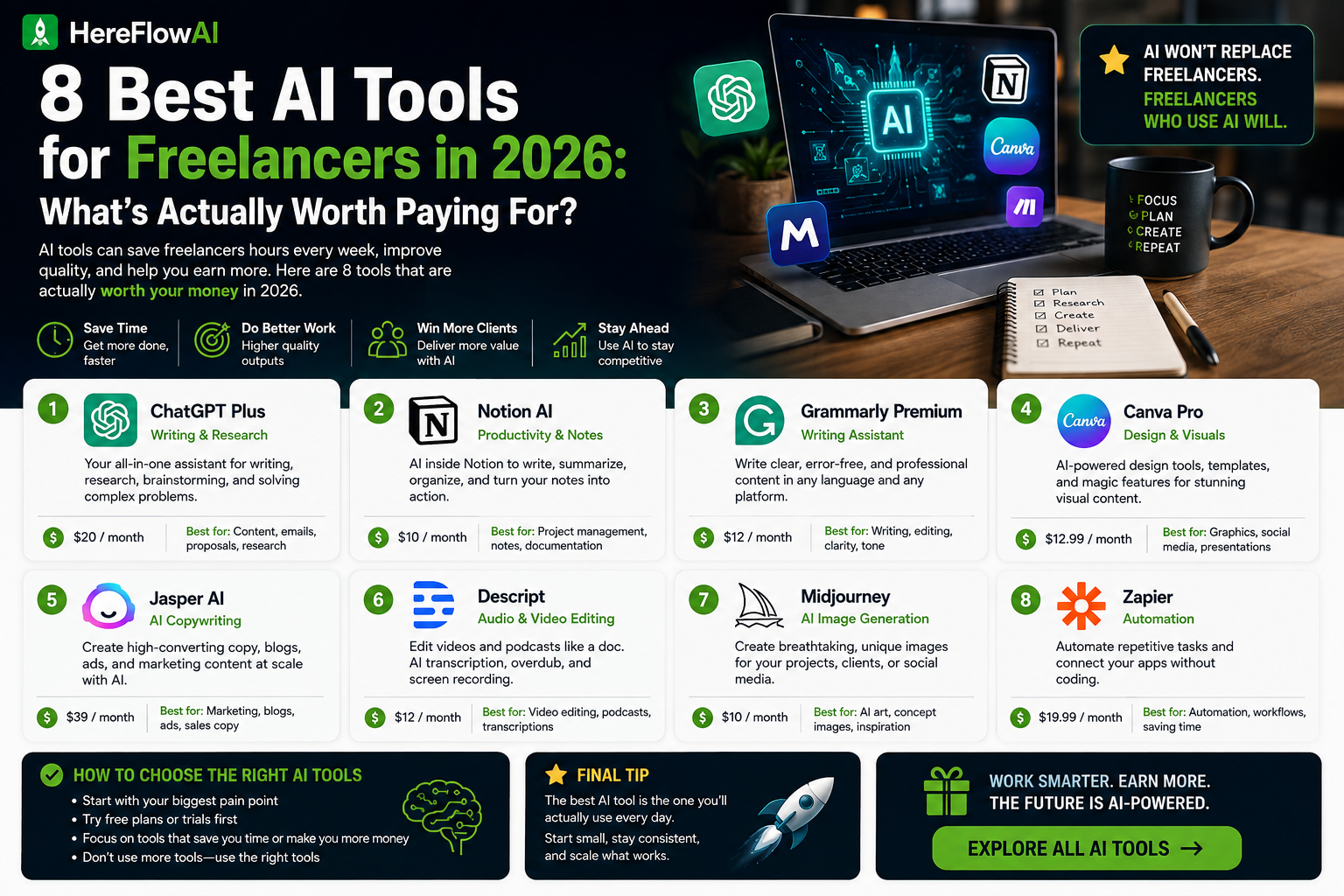
Freelancers can now spend $20 here, $24 there and another $20 somewhere else until their “AI stack” quietly becomes another monthly bill.
That is the wrong way to buy AI software.
The best AI tools for freelancers in 2026 are not the ones with the longest feature lists. They are the ones that remove a recurring task you would otherwise do manually.
💡 HereFlowAI Tip: Start with one general AI assistant. Add a second tool only when it solves a problem your first tool repeatedly handles badly.
Table of Contents
How We Chose the Best AI Tools for Freelancers
A freelancer has a different software problem from a large company.
Every monthly subscription comes directly out of your margin.
So we used four filters.
1. Does it remove recurring unpaid work?
Drafting a client email.
Summarizing a meeting.
Preparing a first draft.
Updating a website.
Moving information between apps.
Those are real costs because they consume time you could spend doing paid work.
2. Can a solo freelancer justify the price?
Enterprise features do not matter if you are one person.
We prefer tools with either a free tier, a trial or a reasonably accessible individual plan.
3. Does it duplicate another tool?
This matters more than most AI lists admit.
ChatGPT and Claude overlap heavily.
Notion AI and general AI assistants overlap in some writing tasks.
Otter and Loom AI overlap around meeting or communication summaries.
Paying for every good tool is usually a bad business decision.
4. Can it improve either sales, delivery or operations?
Every tool should fit one of three buckets:
Win work → Deliver work → Run the business
If it does none of those, it is probably optional.
1. ChatGPT — Best All-Purpose AI Tool for Freelancers
For most freelancers, ChatGPT is the logical first AI subscription to test.
It can help with:
- proposal drafts
- client email drafts
- research
- brainstorming
- document analysis
- spreadsheet work
- code
- content outlines
- file analysis
OpenAI currently offers a free plan, while ChatGPT Plus is $20/month and Pro is $200/month.
Who should use it?
Writers, marketers, virtual assistants, consultants, developers and other freelancers whose work crosses multiple task types.
The real advantage
Breadth.
Instead of buying one tool for brainstorming, another for rewriting and another for file analysis, a general assistant can cover many of those jobs.
The downside
It is general-purpose software.
That means it may be capable of a task without being the best specialist tool for it.
And anything you plan to send to a client still needs human review.
Pricing: Free / Plus $20/month / Pro $200/month.
Verdict: Start here if you do not already have a general AI assistant.
2. Claude — Best for Long Documents and Deep Work
Claude overlaps significantly with ChatGPT, which is exactly why I would not automatically pay for both.
Claude is particularly useful for freelancers who regularly work with:
- long documents
- detailed analysis
- structured writing
- code
- complex project context
- research-heavy drafts
Anthropic currently offers Claude Free. Claude Pro costs $20/month, or $200/year, which works out to about $17 per month when paid annually.
The mistake to avoid
Do not subscribe to Claude just because it is another major AI model.
Ask:
“Which recurring job does Claude perform better enough that I will actually open it every week?”
If you cannot answer that, use the free version first.
When Claude is better than ChatGPT
If your freelance work involves very long documents, complex reasoning or extensive coding/document workflows, Claude may fit better.
When ChatGPT is better
If you want one broad tool covering many different day-to-day tasks, ChatGPT may be easier to standardize around.
Pricing: Free / Pro $20 monthly or $200/year.
Verdict: Excellent tool. Not an automatic second subscription.
3. Hostinger AI Builder — Best for Building a Freelance Website
AI is not useful only for completing client work.
A freelancer also needs somewhere to sell the service.
Hostinger’s current AI Builder lets you describe a website or web app, generate it with AI and then edit it before publishing. Hosting and a custom-domain workflow are integrated into the product.
That makes it particularly relevant for freelancers who still depend entirely on a marketplace profile or social account.
You can use a simple website for:
- portfolio examples
- service packages
- testimonials
- inquiry forms
- lead generation
- case studies
- booking
- selling digital services
Current pricing
In the U.S., Hostinger currently advertises its Premium AI Builder plan at $2.99/month when buying 48 months upfront, with renewal listed at $10.99/month.
That renewal price is important.
Do not judge a hosting product only by the introductory monthly equivalent.
The downside
The attractive entry price requires a long prepaid term.
If you only need a website for two months, that structure is less attractive.
Who should use it?
Freelancers who do not already have a professional website and want something simpler than commissioning a custom build.
Pricing: From $2.99/month on the current 48-month U.S. offer; renewal currently listed at $10.99/month.
Verdict: Strong commercial tool when your problem is not “write faster” but look credible and turn visitors into inquiries.
Ready to build a professional freelance portfolio? Try Hostinger AI Builder and create your site without starting from code.
4. Grammarly — Best for Polishing Client-Facing Writing
Grammarly is less exciting than a new generative AI model.
That can actually be a strength.
A freelancer does not always need another tool that creates content.
Sometimes you need software that catches awkward writing before a client sees it.
Useful cases include:
- proposals
- client emails
- reports
- presentations
- deliverables
- outreach
Grammarly currently has a Free plan. Its Pro plan costs $30/month on monthly billing or $144/year, equivalent to $12 per month on the annual plan. Grammarly currently offers a 7-day Pro trial.
The downside
Grammarly can improve how something is written.
It cannot verify whether your professional advice is correct.
A polished wrong answer is still wrong.
Pricing: Free / Pro $30 monthly / $144 annually.
Verdict: Worth considering when writing quality directly affects how clients judge you.
5. Zapier — Best for Automating Repetitive Freelance Admin
Automation becomes interesting when the same manual action happens every week.
For example:
A lead fills a form.
You copy the information into a spreadsheet.
You create a task.
You send an email.
You update another app.
That is exactly the kind of workflow Zapier is designed to remove.
Zapier currently offers a free plan with 100 tasks per month, while Professional starts at $19.99/month.
AI has changed the pricing calculation
Zapier changed AI-by-Zapier usage in 2026.
Its AI steps now consume tasks according to model tier: Standard uses a 1x multiplier, Advanced 3x and Premium 5x.
That means an AI automation can consume your task allowance faster than a simple traditional Zap.
The downside
Automation feels productive even when the underlying process does not need automating.
Do not spend two hours building a Zap for something you do once per month.
Pricing: Free 100 tasks/month / Professional from $19.99/month.
Verdict: Buy it after you identify repetitive admin—not before.
6. Notion AI — Best if Your Freelance Business Already Lives in Notion
Notion makes the most sense when the AI sits inside information you already keep there.
That may include:
- client notes
- project databases
- meeting notes
- task lists
- research
- SOPs
- content plans
But Notion changed its AI packaging.
The Free and Plus tiers currently include limited AI trial capabilities. Full AI functionality such as Notion Agent and AI Meeting Notes is included in the Business plan at $20 per member per month.
Why I would not recommend Business to every freelancer
$20/month is not expensive for a business tool you genuinely use.
It is expensive for a glorified notes app.
If most of your work lives in Google Drive and email, moving everything into Notion just to access AI may create more work than it saves.
When Notion AI makes sense
When Notion is already your operational system.
Then having AI work with existing project context can be more useful than copying information back and forth into a separate assistant.
Pricing: Free / Plus $10 per member per month with limited AI trial; Business $20 per member per month with full AI features.
Verdict: Powerful for existing Notion users. Optional for everyone else.
7. Otter.ai — Best for Freelancers Who Spend Hours in Meetings
Not every freelancer needs AI meeting software.
But consultants, account managers, recruiters, virtual assistants and agency freelancers can spend a large part of the week in calls.
Otter can transcribe meetings, identify speakers, make recordings searchable and apply AI workflows to meeting content.
The current free plan includes 300 transcription minutes per month. Pro is listed at $16.99 per user per month and includes 1,200 in-app recording minutes.
The real value
Not “AI notes.”
The value is avoiding the situation where you finish a client call and later wonder:
“What exactly did they approve?”
The downside
If you have two short meetings per month, paying for a dedicated meeting tool makes little sense.
Use the free plan first.
Pricing: Free 300 minutes/month / Pro $16.99/user/month.
Verdict: Highly useful for meeting-heavy freelancers. Easy skip for everyone else.
8. Loom Business + AI — Best for Async Client Communication
Some freelancer problems are communication problems disguised as productivity problems.
Writing a five-paragraph explanation of a design revision can take longer than recording your screen.
Loom’s Business + AI plan currently costs $24/user/month and includes AI features such as automatic titles, summaries, chapters, tasks, filler-word removal and video-to-text workflows.
Useful freelancer situations include:
- design walkthroughs
- website handoffs
- project updates
- bug demonstrations
- client training
- asynchronous presentations
The downside
$24/month is difficult to justify if you rarely record your screen.
And basic Loom usage may already be enough without the AI plan.
Pricing: Business + AI $24/user/month.
Verdict: Valuable for async client-heavy workflows. Unnecessary for many freelancers.
The Best AI Stack for Freelancers Is Smaller Than You Think
This is where most AI tool lists go wrong.
They show eight good products.
The reader concludes:
“I need eight products.”
You do not.
For many solo freelancers, a sensible starting stack is:
Writer or marketer
ChatGPT OR Claude
+
Grammarly
Add Notion AI only if your project workflow already lives in Notion.
Consultant or virtual assistant
ChatGPT
+
Otter.ai
Add Zapier only when you identify recurring admin worth automating.
Developer
Claude
+
Zapier
Add a website builder only when you need a stronger public portfolio or service site.
Creator or video freelancer
ChatGPT
+
Loom AI
Then invest in a website when you need to turn audience or referrals into a more professional sales funnel.
| Freelancer type | Start with | Add only if needed | Why |
|---|---|---|---|
| Writer / marketer | ChatGPT or Claude + Grammarly | Notion AI | Covers drafting, editing and project context without overlapping subscriptions |
| Developer | Claude + Zapier | Hostinger AI Builder | Reasoning/coding plus automation; add a site builder only when you need a public portfolio |
| Consultant / VA | ChatGPT + Otter.ai | Zapier | Research, meeting capture and admin automation |
| Creator / video freelancer | ChatGPT + Loom Business + AI | Hostinger AI Builder | Planning, client communication and service presentation online |
Still relying only on a marketplace profile? Build a freelance portfolio and service website with Hostinger AI Builder.
When Should You Actually Pay for an AI Tool?
A free tier becomes a paid subscription when you can answer this:
“What recurring task is the paid plan removing?”
Good reasons include:
- usage limits interrupt paid client work
- a premium feature removes repetitive admin
- automation saves a recurring manual process
- the paid version becomes part of client delivery
- the tool helps convert leads into paid work
Bad reason:
“Everyone on X says this tool is amazing.”
Use a simple subscription test
Before renewing any AI product, ask:
Did I use it weekly?
Did it help me win work, deliver work or reduce admin?
Does another tool I already pay for do 80% of the same job?
If the third answer is yes, consider cancelling one.
That is how freelancers should build software stacks.
Not by collecting subscriptions.
| Tool | Best for | Current price signal | Main limitation |
|---|---|---|---|
| ChatGPT | Drafts, brainstorming, files, research | Free; Plus $20/month; Pro $200/month | Broad rather than specialized; client-ready output still needs checking |
| Claude | Long documents, reasoning, writing, coding | Free; Pro $20/month or $200/year | Paying for both Claude and ChatGPT is redundant for many solo freelancers |
| Hostinger AI Builder | Portfolio, service site, landing pages | From $2.99/month on a 48-month US offer; renews at $10.99/month | Lowest rate needs a long prepaid term; renewal is higher |
| Grammarly | Proposals, emails, client-facing writing | Free; Pro $30 monthly or $144/year | Improves writing, not subject-matter judgment |
| Zapier | Automating repetitive admin | Free: 100 tasks/month; Professional from $19.99/month | AI steps can consume multiple tasks depending on model tier |
| Notion AI | Project context, notes, follow-ups | Free/Plus: limited AI trial; Business $20/member/month for full AI | Full AI access can be expensive for a basic solo notes workflow |
| Otter.ai | Meeting transcription and notes | Free: 300 min/month; Pro $16.99/user/month | Only worth paying for if meetings are frequent |
| Loom Business + AI | Async client walkthroughs and updates | $24/user/month | Overkill if you rarely send screen recordings |
Final Verdict: Which AI Tools Are Actually Worth It?
There is no single best AI stack for every freelancer.
But there is a sensible buying order.
Start with one general assistant.
For most people that means ChatGPT or Claude.
Then identify your largest non-billable bottleneck.
If it is writing quality, look at Grammarly.
If it is repetitive admin, Zapier.
If it is meetings, Otter.
If it is client walkthroughs, Loom.
If it is managing your entire business inside Notion, Notion AI becomes more compelling.
And if your problem is that clients cannot find, evaluate or contact you outside a marketplace, an AI website builder may create more business value than buying another chatbot.
The key is simple:
Do not buy AI tools because they are powerful. Buy them because they remove a recurring cost from your freelance business.
FAQ
What are the best AI tools for freelancers in 2026?
ChatGPT and Claude are strong general-purpose choices. Grammarly is useful for client-facing writing, Zapier for automation, Notion AI for integrated workspace tasks, Otter.ai for meeting-heavy workflows and Loom AI for async client communication. The best combination depends on what work you repeatedly perform.
Should freelancers pay for ChatGPT and Claude?
Usually not at the beginning. The two products overlap enough that many freelancers can use one paid plan and keep the other on its free tier. Pay for both only if each has a recurring role in your workflow.
What is the best free AI tool for freelancers?
There is no universal winner. ChatGPT and Claude both provide free access, while Grammarly, Zapier, Notion and Otter also provide free or limited entry tiers. Choose based on the task you need to solve rather than the biggest free feature list.
Which AI tool is best for freelance writing?
ChatGPT or Claude can handle drafting and ideation, while Grammarly is designed more specifically for improving clarity, grammar and tone. A writer may need one general assistant plus an editing tool rather than several generative writing subscriptions.
Which AI tool is best for freelance automation?
Zapier is a strong option for connecting apps and automating repeatable workflows. Its free plan currently includes 100 tasks per month, while paid Professional plans start at $19.99 per month.
How much should a freelancer spend on AI tools?
There is no correct monthly number. The better rule is that each paid tool should solve a recurring business problem without substantially duplicating another subscription. Start free, identify bottlenecks and upgrade only when the paid feature has a clear role.