

Affiliate Disclosure: This article contains affiliate links. If you hire a freelancer through one of these links, HereFlowAI may earn a commission at no extra cost to you. Recommendations are based on project fit, not commission size.
How Much Does It Cost to Hire a WordPress Developer in 2026?
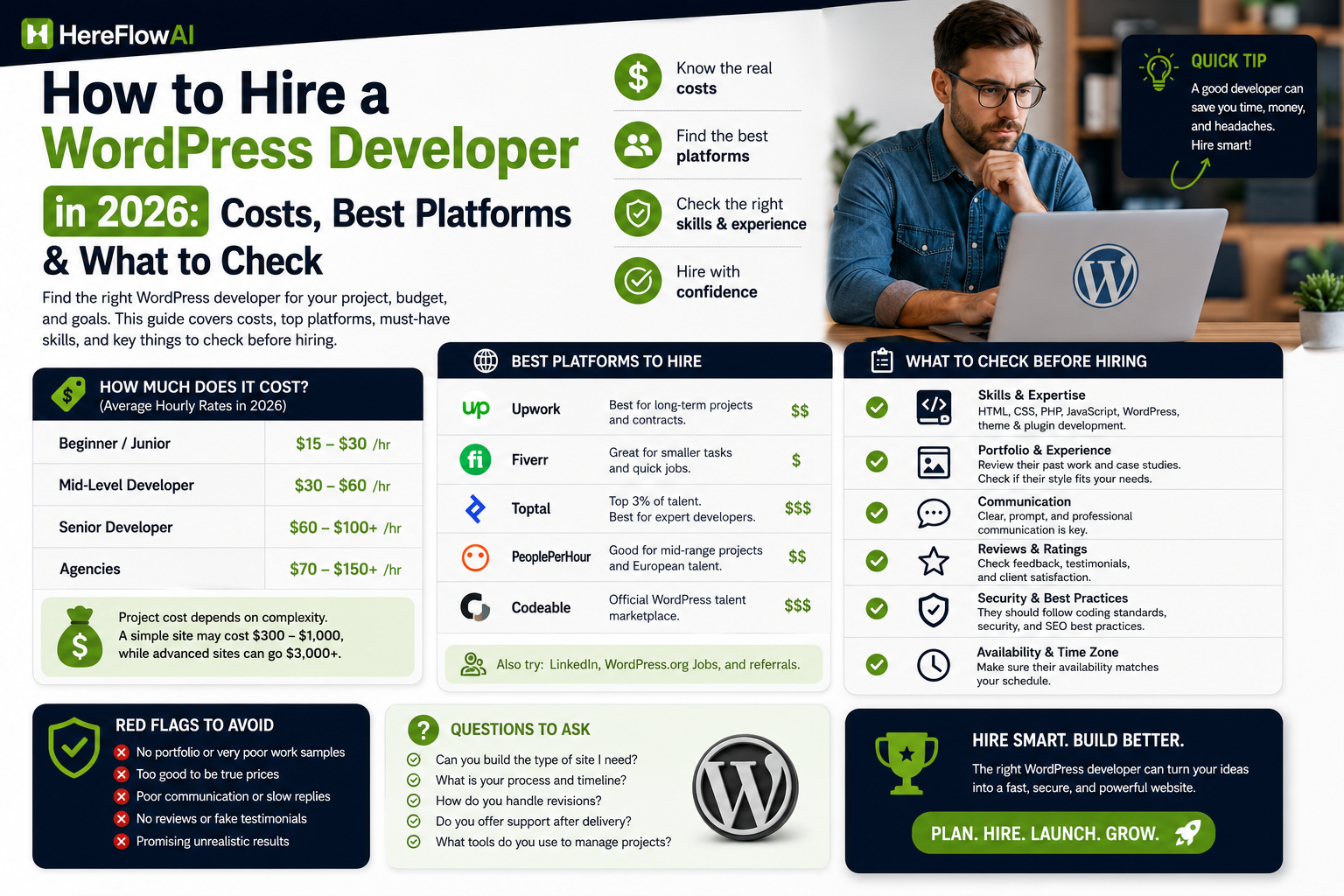
Quick answer: The cost depends heavily on where you hire. This guide cites roughly $15–$28 per hour on Upwork, $80–$120 per hour through Codeable, and Fiverr’s 2026 guide lists freelance WordPress rates around $50–$250 per hour.
If you are choosing between marketplaces, compare our Fiverr vs Upwork guide before hiring.
A WordPress developer can cost $15–$28 per hour on Upwork, $80–$120 per hour through Codeable, while Fiverr’s updated 2026 cost guide cites freelance WordPress rates ranging from $50 to $250 per hour. Those numbers look contradictory until you realize they are describing very different kinds of developers, projects and hiring processes.
The mistake is searching for the “cheapest WordPress developer.” The better question is: how expensive would it be if this project were done badly?
💡 HereFlowAI Tip: For a small, clearly defined WordPress task, Fiverr is often the quickest place to start. For custom plugins, complex WooCommerce work or a revenue-critical site, pay more for stronger vetting rather than optimizing for the lowest quote.
Table of Contents
How Much Does It Cost to Hire a WordPress Developer in 2026?
There is no useful single “average WordPress developer price.”
Project scope matters more than the label WordPress developer.
Upwork currently lists median WordPress developer rates around $15–$28/hour. Its own hiring guide estimates roughly $300–$1,000 for a landing page or simple site, $1,000–$3,000 for a business website, $2,500–$8,000 for an e-commerce store, and $3,000–$10,000+ for custom theme or plugin development.
Codeable operates at a different end of the market. Its experts are priced around $80–$120/hour, with example starting prices of $420 for speed and security optimization, $960 for custom plugin development, $2,500 for website design/development and $3,200 for e-commerce development. Codeable also applies a 17.5% service fee.
Fiverr’s 2026 WordPress cost guide places freelance WordPress development broadly at $50–$250/hour, although actual Gigs vary according to freelancer, scope and package.
The lesson is not that one platform is “cheaper.”
It is that they sell different levels of choice, vetting, support and project risk.
| Hiring option | Current pricing signal | Best fit | Important cost detail |
|---|---|---|---|
| Fiverr | Fiverr’s 2026 WordPress cost guide cites roughly $50–$250/hour for freelance WordPress developers. | Clearly scoped fixes, landing pages, setup, small-to-medium projects | Buyer service fee is 5.5%; Fiverr’s current payment terms also add $3.50 on purchases under $200. |
| Upwork | Current marketplace data shows a typical median of $15–$28/hour. | Projects where you want to interview candidates and manage an ongoing freelancer relationship | Upwork’s current examples range from $300–$1,000 for a simple site to $3,000–$10,000+ for custom theme/plugin work. |
| Codeable | $80–$120/hour | WordPress-specific, custom, WooCommerce, plugin, security or higher-risk work | Codeable adds a 17.5% service fee. Its sample pricing starts around $420 for speed/security optimization, $960 for a custom plugin, $2,500 for website design/development and $3,200 for e-commerce. |
Which Type of WordPress Developer Do You Actually Need?
Before you look at profiles, identify what you are buying.
Small WordPress fixes
Examples:
- CSS or layout problems
- Elementor fixes
- plugin configuration
- small theme changes
- migrations
- basic speed improvements
For this type of work, paying premium specialist-network pricing may be unnecessary.
A marketplace freelancer can make sense because the task is limited and easy to verify.
Business website development
A complete business website requires more than “install WordPress.”
The developer may need to handle:
- responsive layout
- forms
- analytics
- theme customization
- plugin selection
- basic performance
- staging
- deployment
Here, portfolio quality matters more than the lowest hourly rate.
WooCommerce
WooCommerce carries more risk because mistakes can affect checkout, payments, taxes, shipping or customer experience.
For a basic store, a strong freelancer may be enough.
For complicated payment gateways, subscriptions, custom checkout logic or integrations, WordPress-specific specialists become more attractive.
Custom plugins and integrations
This is where cheap development can become expensive.
You are no longer paying someone to configure WordPress. You are paying for PHP, database logic, APIs, security, testing and maintainable code.
If the code becomes part of a revenue-critical system, vetting matters much more than getting the lowest bid.
Best Places to Hire a WordPress Developer in 2026
Fiverr / Fiverr Pro — Best for fast comparison
Fiverr has a dedicated WordPress development category covering website development, customization, maintenance, bug fixes, migration and related WordPress work.
The biggest advantage is speed.
You can compare:
- service scope
- freelancer specialization
- portfolio
- reviews
- packages
- delivery terms
without creating a traditional job opening.
The real downside: marketplace choice can create noise. Two developers can both call themselves “WordPress experts” while having completely different technical ability.
Fiverr also charges buyers a service fee. Its current payment terms list a standard 5.5% service fee, plus $3.50 on purchases under $200. Applicable taxes can also depend on location.
That means you should compare checkout cost, not only the Gig headline price.
Upwork — Better when you want to interview candidates
Upwork is stronger when the project does not fit neatly into a predefined package.
You can explain the project, receive proposals, interview developers and establish hourly or project-based relationships.
Its current WordPress talent data shows median rates around $15–$28/hour, but complex work can obviously cost more.
Upwork makes more sense than Fiverr when:
- the scope is still evolving
- you expect ongoing work
- you want to interview several candidates
- collaboration may last months rather than days
Codeable — Best when WordPress expertise matters more than price
Codeable specializes in WordPress.
Instead of competing primarily on price, it emphasizes vetted experts and standardized rates around $80–$120/hour.
That makes it a logical option for:
- custom plugins
- difficult WooCommerce issues
- performance problems
- security work
- complex integrations
- fixing previous development mistakes
The drawback is obvious: price.
You may be paying far more than a marketplace freelancer.
For a simple five-page brochure website, that premium may not make financial sense.
For a store losing sales because checkout is broken, the calculation changes.
Agency or direct freelancer — Best when accountability matters
Hiring outside a marketplace can give you a direct relationship and more flexibility.
But the platform protections disappear.
Before paying, clarify:
- contract
- milestones
- ownership
- backups
- staging environment
- payment schedule
- support after launch
The quality range is huge. “Agency” does not automatically mean better.
| Your project | Best starting point | Why | What to verify before hiring |
|---|---|---|---|
| Small bug, CSS fix, basic setup | Fiverr Marketplace | Fast comparison and a large pool of narrowly packaged WordPress services | Exact scope, recent relevant reviews, backup/staging plan |
| Landing page or small business site | Fiverr / Upwork | Both can work well when the deliverables are specific and easy to verify | Live portfolio, mobile quality, performance, ownership of files/accounts |
| Ongoing WordPress freelancer | Upwork | Better fit when you want to interview, track hours and maintain a longer working relationship | Availability, communication cadence, maintenance responsibilities |
| Custom plugin, complex WooCommerce, critical integrations | Codeable / Fiverr Pro | Vetting matters more because a bad implementation can be expensive to unwind | Architecture experience, testing plan, staging, warranty/support, code ownership |
| Large business or revenue-critical build | Specialist network or agency | Higher cost can be justified by QA, project management and specialist coverage | Named team, scope control, acceptance criteria, post-launch support |
The Rule Most Hiring Guides Miss: Match the Platform to the Cost of Failure
This is the simplest framework in this entire guide.
Ask:
If this developer gets the task wrong, what happens?
If the answer is:
“The button still looks wrong.”
Use a lower-risk hiring route.
If the answer is:
“Customers cannot complete checkout.”
Spend more time vetting.
If the answer is:
“Our custom plugin could expose customer data or break production.”
Stop shopping by hourly rate.
That is why comparing a $25 marketplace task with a specialist WordPress network is usually meaningless. They solve different problems.
How to Vet a WordPress Developer Before Hiring
You do not need to be a developer yourself.
You need evidence.
1. Ask for live WordPress projects
Screenshots are weak evidence.
Ask for live sites relevant to your project.
For WooCommerce work, request WooCommerce examples.
For plugin development, ask about actual plugin functionality.
For performance work, ask what they changed and why.
2. Ask what they will not do
This question is underrated:
“Which parts of this project are outside your strongest area?”
Good professionals usually know their limits.
A person claiming to be world-class at design, PHP, React, WooCommerce, SEO, security, branding, copywriting and server administration should make you investigate further.
3. Ask about staging
For an existing business site, development should not casually happen on production.
Ask:
- Will you use a staging site?
- Will you create a backup first?
- How will changes move into production?
- What happens if deployment breaks something?
4. Define ownership
When the project ends, you should know who owns:
- WordPress admin access
- hosting account
- domain
- theme license
- plugin licenses
- code
- design/source files
Do not wait until the relationship ends to discover that important accounts belong to the freelancer.
5. Ask how post-launch bugs are handled
A project can look fine at delivery and reveal bugs later.
Clarify:
- what counts as a bug
- what counts as new work
- how long fixes are covered
- ongoing maintenance pricing
Codeable, for example, includes a 28-day bug-fixing warranty in its pricing structure.
That does not mean every developer needs the same warranty. It means support terms should be defined before you hire.
Red Flags When Hiring a WordPress Developer
“I can start immediately” before asking questions
Fast availability is not bad.
Starting without understanding the project is.
A strong developer normally wants to understand scope before committing to price and timeline.
One generic price for every website
A five-page brochure site and a custom WooCommerce build should not have the same scope.
Generic pricing usually means the details will be negotiated after work begins.
Too many plugins for basic functionality
Plugins are not automatically bad.
But every plugin adds another dependency.
Ask why each important plugin is necessary.
No backup or staging plan
For an existing business website, this should be treated seriously.
The cheapest quote wins automatically
A cheap developer who needs to be replaced can cost more than the expensive developer you rejected.
The relevant number is total cost to get the project working, not the opening quote.
Copy-and-Paste WordPress Developer Brief
Do not message ten freelancers with:
“Hi, I need a WordPress website. Price?”
Send this instead:
Project:
WordPress website / redesign / fix / WooCommerce project
Business:
[What the business does]
Main objective:
[Generate leads / sell products / bookings / content site / other]
Current website:
[URL or “new project”]
Required pages/features:
[List]
WordPress setup:
[Existing theme/plugins if applicable]
Integrations required:
[Payments, CRM, email, APIs, booking system, etc.]
Design:
[Figma / existing branding / reference websites / developer to design]
Mobile requirements:
[Anything specific]
Performance requirements:
[Existing issues or expectations]
Deliverables:
[Site, source files, documentation, migration, etc.]
Deadline:
[Date]
Budget:
[Range]
Post-launch support required:
[Yes/No + expectations]
Please include:
2–3 relevant WordPress projects and explain which part you personally completed.
That last line is important.
It helps separate a portfolio someone participated in from work they personally delivered.
Reduce Risk With a Small First Milestone
You do not always need to award the entire project immediately.
For a larger build, begin with something clearly measurable:
- technical discovery
- one page
- one integration
- staging setup
- prototype
- audit
Evaluate:
- communication
- technical judgement
- ability to follow requirements
- delivery quality
Then expand the engagement.
This is particularly useful when a candidate has a strong profile but you have never worked together.
Final Verdict: Where Should You Hire a WordPress Developer?
For small, well-defined WordPress work, start with a marketplace such as Fiverr. The ability to compare predefined services can make the buying process faster.
For ongoing freelance development, Upwork gives you a hiring model that is better suited to interviewing and longer engagements.
For complex WordPress-specific projects where mistakes carry substantial cost, a vetted specialist network such as Codeable—or vetted talent through Fiverr Pro—deserves serious consideration.
The biggest mistake is not choosing the “wrong platform.”
It is buying more developer than the project needs or, worse, buying less developer than the project risk requires.
Choose based on the cost of failure.
Then compare price.
FAQ
How much does it cost to hire a WordPress developer?
Upwork currently shows median WordPress developer rates around $15–$28/hour. Codeable uses rates around $80–$120/hour, while Fiverr’s 2026 WordPress cost guide cites a broader freelance range of $50–$250/hour. These figures describe different talent pools and project types, so compare scope before comparing rates.
Where is the best place to hire a WordPress developer?
For clearly scoped work, Fiverr can be convenient. Upwork fits longer or less-defined engagements. Codeable specializes in vetted WordPress talent for projects where expertise matters more than finding the lowest price.
Is Fiverr good for hiring WordPress developers?
Yes, particularly when your task is specific enough to compare packages and portfolios. The downside is that skill levels vary, so vet relevant experience instead of choosing only by rating or price.
Should I hire a freelancer or WordPress agency?
A freelancer can be more cost-efficient for defined projects. An agency may make more sense when you require project management, multiple disciplines, larger capacity or ongoing accountability.
Do I need a developer for every WordPress website?
No. A basic site built with an established theme or page builder may not require custom development. A developer becomes more valuable when you need custom code, integrations, WooCommerce customization, performance troubleshooting or complex functionality.
What should I give a WordPress developer before work starts?
Provide project goals, required functionality, examples, existing technical setup, deadline, budget range and acceptance criteria. For an existing site, agree on backups and staging before changes are made.


[…] If you would rather hire someone to build, fix or customize the site, compare current freelancer costs in our guide to hiring a WordPress developer. […]
[…] an implementation quote? We maintain a HubSpot specialist hiring guide and a WordPress developer hiring checklist. You can also compare relevant implementation providers on […]
[…] Compare relevant providers using our HubSpot setup service hiring guide and WordPress developer checklist. […]