
⚠️ Disclosure: This page contains affiliate links. If you buy through them, we may earn a commission at no extra cost to you.
87% of content creators already use AI tools. The problem isn’t finding tools — it’s that most guides list 30 of them with no indication of which ones you actually need.
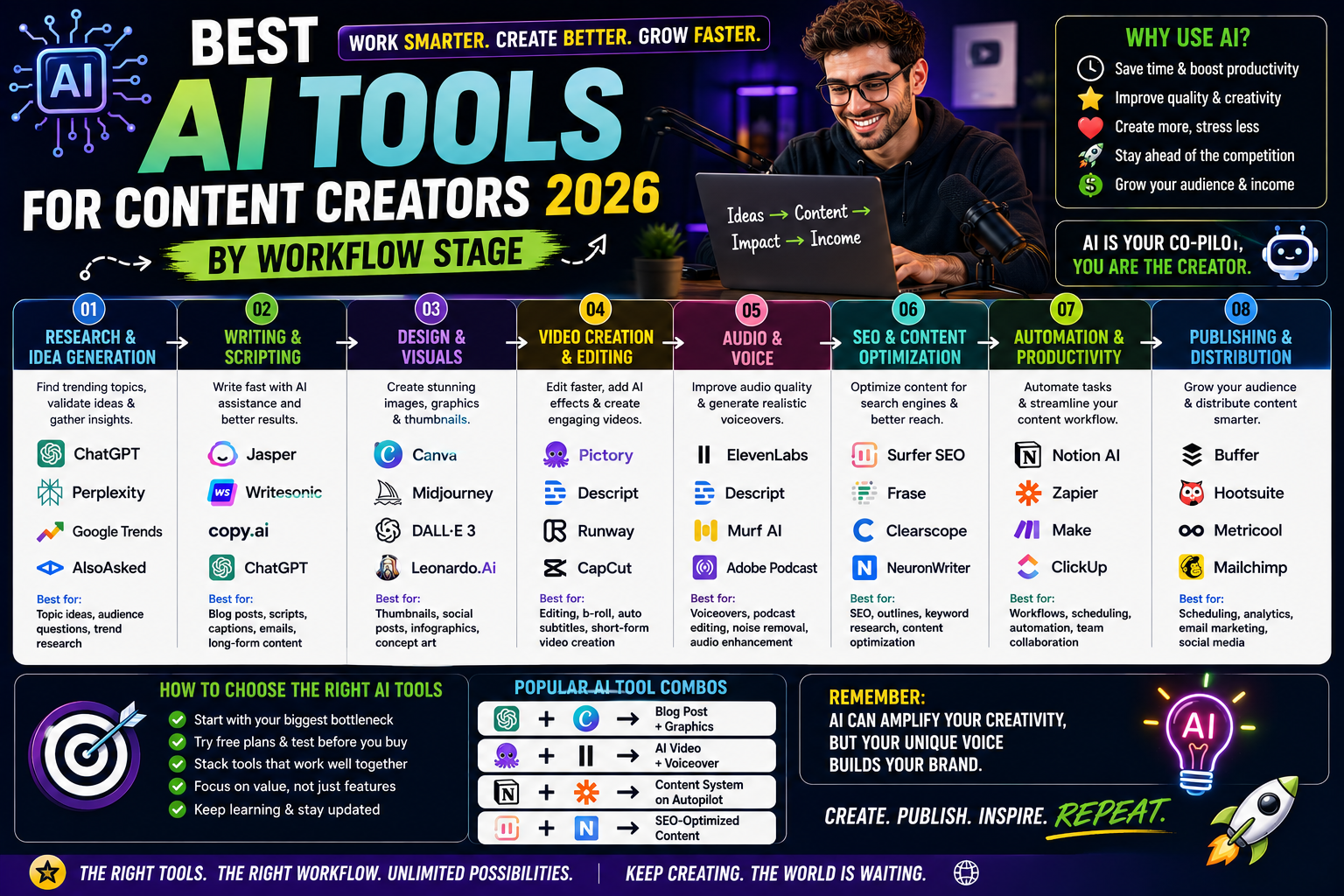
This guide is organized by where the time goes: idea → script → record → edit → thumbnail → publish → repurpose. One tool per stage.
💡 HereFlowAI Tip: The goal isn’t the biggest stack. It’s the fewest tools that cover your whole workflow. Every extra subscription is another dashboard you have to check.
Table of Contents
The 7-Stage Creator Workflow
Before buying anything, find your bottleneck:
| Stage | Tool | Free Plan | Paid From |
|---|---|---|---|
| Ideas & research | Perplexity | ✅ Yes | $20/mo |
| Scripting | ChatGPT / Claude | ✅ Yes | $20/mo |
| Editing (long-form) | Descript | ✅ Limited | $12/mo |
| Editing (short-form) | CapCut | ✅ Yes | $11.99/mo |
| Thumbnails (layout) | Canva | ✅ Strong | $15/mo |
| Thumbnails (art) | Midjourney | ❌ None | $10/mo |
| SEO & analytics | VidIQ / TubeBuddy | ✅ Yes | Varies |
| Repurposing | Opus Clip | ✅ Limited | ~$19/mo |
Editing and repurposing are where most creators lose their week. Start there.
Best Tool for Each Stage
1️⃣ Ideas & Research — Perplexity
Returns sourced answers, which matters when you’re making factual claims on camera.
Free · Pro $20/mo
2️⃣ Scripting — ChatGPT or Claude
ChatGPT for structure and hooks. Claude for longer scripts where voice consistency matters.
Both free · $20/mo each
⚠️ Never publish an AI script verbatim. Use it for structure, then add your examples and your voice. Audiences detect generic writing immediately.
3️⃣ Recording — no AI needed
Your phone plus decent audio beats any tool. A $50 mic improves perceived quality more than a $50/mo subscription.
4️⃣ Editing — Descript
Edit video by editing the transcript. Delete a sentence from the text, it disappears from the video. Removes filler words automatically.
Free plan (limited exports) · From $12/mo
Best for: talking-head content, podcasts, tutorials
Alternative — CapCut: better for short-form and fast turnaround. Free with watermark on some assets · Pro $11.99/mo
5️⃣ Thumbnails — Canva + Midjourney
The most common professional setup: Midjourney generates the background or character art, Canva handles text and layout.
⚠️ Important: Most AI image generators still handle text poorly. Generate the image in AI, add the text in Canva. Don’t try to make AI write your thumbnail text.
Canva free plan alone is enough while you’re building a channel.
Canva Free · Pro $15/mo | Midjourney from $10/mo
6️⃣ Publishing & SEO — VidIQ or TubeBuddy
Keyword research, tag suggestions, thumbnail A/B testing.
Both have free plans. TubeBuddy is easier to start; VidIQ has stronger keyword research.
7️⃣ Repurposing — Opus Clip
Turns long videos into vertical clips automatically. If you’re posting 20–60 minute videos and not cutting Shorts from them, you’re leaving reach unused.
Free plan (limited) · Pro ~$19/mo
Complete Comparison Table
| Stack | Cost | Tools | Best For |
|---|---|---|---|
| 🟢 Starter | $0/mo | ChatGPT · Canva Free · CapCut · TubeBuddy · Perplexity | Building your first audience |
| 🟡 Growing | ~$45/mo | ChatGPT Plus · Canva Pro · Midjourney | Improving CTR & quality |
| 🔴 Scaling | ~$85/mo | Above + Descript · Opus Clip · VidIQ paid | Publishing weekly or more |
Three Stacks by Budget
🟢 $0/month — Starting Out
ChatGPT · Canva Free · CapCut · TubeBuddy Free · Perplexity Free
Genuinely enough to run a channel. Don’t upgrade until a free limit is actively blocking you.
🟡 ~$45/month — Growing
ChatGPT Plus $20 · Canva Pro $15 · Midjourney $10
The thumbnail and script quality jump is where most channels see CTR improve.
🔴 ~$85/month — Publishing Weekly+
Above + Descript $12 · Opus Clip $19 · VidIQ paid
Only worth it if you’re publishing consistently. Below 4 videos/month, you won’t recover the cost in time saved.
What AI Still Can’t Do
Being honest about the ceiling:
- ❌ Know your audience. AI produces variants; the instinct for what to test comes from you.
- ❌ Be interesting. AI writes competent, average content. Average doesn’t get shared.
- ❌ Replace editing judgment. AI editors handle rough cuts well. Final polish still needs a human eye.
- ❌ Build trust. Audiences follow people, not output.
Turning This Into Income
Sell these skills. Short-form video editing is one of the highest-demand beginner gigs on Fiverr in 2026 — $30–$100 per video, and clients return weekly.
Learn the tools properly. Udemy courses on CapCut, Premiere, and Canva drop to $9.99–$14.99 during regular sales.
Final Verdict
Start with the free stack. Find your bottleneck — for most creators it’s editing or repurposing — and buy one tool to fix it.
The creators getting most value from AI in 2026 aren’t the ones with ten subscriptions. They’re the ones who identified the single stage eating their week and automated exactly that.
FAQ
What are the best AI tools for content creators in 2026?
ChatGPT for scripting, Descript or CapCut for editing, Canva for thumbnails, Opus Clip for repurposing, and VidIQ for SEO. All have functional free plans.
Can I create content using only free AI tools?
Yes. ChatGPT, Canva, CapCut, TubeBuddy, and Perplexity all have free tiers that cover a full workflow.
Do I need all these tools?
No. Start with ChatGPT and one design tool. Add editing or repurposing tools only when production volume justifies them.
Can AI generate YouTube thumbnails with text?
Poorly. Most AI image generators struggle with text rendering. Generate the image with AI, then add text in Canva.
Will AI replace content creators?
No — but it changes what’s valuable. AI produces competent average content cheaply, which makes distinctive perspective and personality worth more, not less.
How much should a creator spend on AI tools?
$0 starting out, around $45/month growing, up to $85/month publishing weekly. Beyond that, you’re usually paying for unused capacity.
Read next: Best AI Tools for Freelancers 2026 →
Also read: High Income Skills to Learn in 2026 →