
⚠️ Disclosure: This page contains affiliate links. If you buy through them, we may earn a commission at no extra cost to you.
Most comparisons of these two end with “it depends.” This one doesn’t.
After looking at the independent test data, the answer is clear for most people — but there’s one specific case where the cheaper-looking option costs you more.
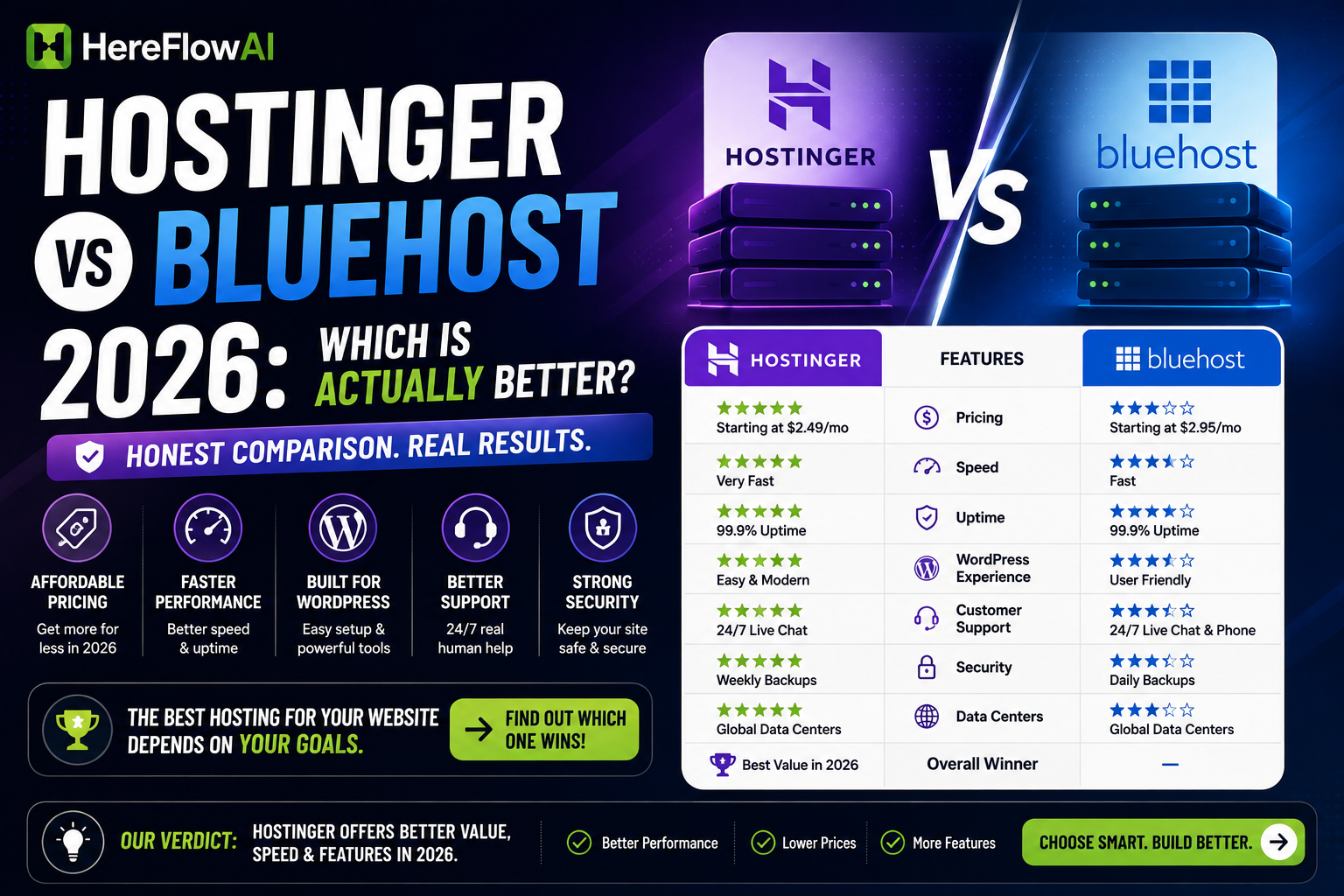
💡 Short answer: Hostinger for most people. Faster servers, lower renewal cost, more storage. Bluehost only if you specifically want cPanel or phone support.
Table of Contents
The Verdict First
| Feature | Hostinger | Bluehost | Winner |
|---|---|---|---|
| Intro price | from $1.99–2.99/mo | from $2.95/mo | 🟢 Hostinger |
| Renewal price | ~$8.99/mo | ~$11.99/mo | 🟢 Hostinger |
| Storage (entry) | 100GB NVMe | 10GB SSD | 🟢 Hostinger |
| Websites (entry) | Up to 100 | 1 | 🟢 Hostinger |
| Server tech | LiteSpeed | Apache | 🟢 Hostinger |
| TTFB (benchmark) | ~291ms | ~463ms | 🟢 Hostinger |
| Uptime | 99.9–100% | 99.9–100% | 🟡 Tie |
| Control panel | hPanel (custom) | cPanel (standard) | 🟡 Depends |
| Free domain | ✅ 1 year | ✅ 1 year | 🟡 Tie |
| Free SSL | ✅ Yes | ✅ Yes | 🟡 Tie |
| CDN included | ❌ (QUIC.cloud available) | ✅ Cloudflare | 🔵 Bluehost |
| Phone support | ❌ Chat + email | ✅ Yes | 🔵 Bluehost |
| WordPress.org endorsed | ❌ | ✅ Yes | 🔵 Bluehost |
| Money-back | 30 days | 30 days | 🟡 Tie |
Hostinger wins 5 of 8 — and wins the categories that affect you every day.
Pricing — Including the Part They Hide
Both advertise low intro prices. Both charge significantly more at renewal. That’s the number that matters.
| Cost | Hostinger | Bluehost |
|---|---|---|
| Year 1 (intro) | ~$36 | ~$36 |
| Years 2–3 (renewal) | ~$216 | ~$288 |
| 3-year total | ~$252 | ~$324 |
| Difference | Bluehost costs ~$70 more for less storage and fewer sites | |
⚠️ Two things buried in the fine print
1. Storage: 100GB vs 10GB
Hostinger’s entry plan gives 10× the storage. If you’re running a site with images, that difference shows up fast.
2. Websites: 100 vs 1
Bluehost’s Basic plan hosts one website. Want a second? Upgrade. Hostinger’s Premium plan allows up to 100 on the same price tier.
For a freelancer building a portfolio plus a client site, that alone decides it.
The real 3-year cost
Hostinger:  Year 1 ~$36  ·  Years 2–3 ~$216   = ~$252
Bluehost:   Year 1 ~$36  ·  Years 2–3 ~$288   = ~$324
Roughly $70 more for less storage and fewer sites.
Speed: The Real Numbers
Here it gets interesting — independent tests disagree, and it’s worth knowing why.
Tests favouring Hostinger
Benchmark data puts Hostinger at roughly 291ms TTFB vs Bluehost’s 463ms — a 37% gap that becomes noticeable under real traffic.
Another test measured Hostinger 240ms faster than Bluehost.
Tests favouring Bluehost
Some reviewers measured Bluehost with faster FCP and LCP times, and Bluehost’s own data cites a 0.35s US load time.
🧩 Why the disagreement — the technical reason
Hostinger runs LiteSpeed. Bluehost runs Apache.
LiteSpeed handles caching natively. Apache needs a caching plugin and configuration to reach comparable speed.
That means:
- Test a fresh, unoptimised WordPress install → Hostinger looks much faster
- Test with Bluehost’s Cloudflare CDN and caching configured → the gap narrows
What it means for you: if you’re not going to configure caching plugins yourself, Hostinger is faster out of the box. If you’re technical and will optimise anyway, the difference shrinks.
Uptime: both hit 99.9–100% in extended monitoring. Neither has a reliability problem.
Control Panel: hPanel vs cPanel
Hostinger — hPanel (custom)
Modern, task-organised: install WordPress, set up email, configure SSL. Arguably the easiest onboarding in budget hosting for a first-time site owner.
Bluehost — cPanel (industry standard)
Every hosting tutorial online is written for cPanel. If you’ve used hosting before, you already know it.
💡 The tradeoff: hPanel is easier to learn. cPanel is easier to find help for. If you’re a beginner searching YouTube tutorials, cPanel has more of them.
Support
Bluehost: live chat plus phone support, generally more responsive.
Hostinger: chat and email. Wait times reported anywhere from 10 minutes to over an hour — though reviewers note the quality is consistent once you’re through.
Winner: Bluehost — the only category where it clearly wins on daily experience.
If phone support matters to you, that’s a legitimate reason to choose Bluehost regardless of the price difference.
Built for Developers? SSH, Git & Staging
If you’re building client sites, not just a portfolio, these matter more than raw speed.
| Feature | Hostinger | Bluehost |
|---|---|---|
| SSH Access | Free, all plans | $5.99/mo extra |
| Git Integration | Built-in | Manual setup |
| Staging Environment | 1-click | Manual setup |
| PHP Versions | Up to 8.2 | Up to 8.1 |
Free SSH matters more than it looks — basic command-line access costs extra on Bluehost. On Hostinger it’s included from the cheapest plan.
What Independent Reviewers Say
Beyond speed tests, it’s worth checking how buyers rate their experience after months of real use — not the first week.
On G2, a business software review platform run by neither company, Hostinger scores higher across every satisfaction category: ease of setup, quality of support, and free migration help when moving an existing site over.
| Category (G2 score /10) | Hostinger | Bluehost |
|---|---|---|
| Ease of Setup | 9.0 | 7.3 |
| Quality of Support | 8.7 | 6.9 |
| Free Migration | 8.9 | 5.2 |
| Meets Requirements | 8.8 | 7.6 |
The widest gap is on setup and support — the two things a non-technical freelancer notices first.
Which One Should You Pick?
✅ Choose Hostinger if you:
- Want the lowest total cost over 3 years
- Are hosting more than one website
- Want speed without configuring caching plugins
- Are building a portfolio, blog, or affiliate site
- Need real storage (100GB vs 10GB)
🔵 Choose Bluehost if you:
- Specifically want cPanel
- Want phone support
- Care about the WordPress.org endorsement
- Are hosting exactly one site and will optimise it yourself
🟡 Consider neither if you:
- Need managed WordPress at scale → look at Kinsta or WP Engine
- Are running an ecommerce store with real traffic → budget shared hosting will bottleneck
Final Verdict
Hostinger, for most people.
It’s cheaper at renewal, roughly 37% faster on TTFB in independent benchmarks, gives 10× the storage, and hosts up to 100 sites where Bluehost hosts one.
Bluehost’s genuine advantages — cPanel, phone support, WordPress.org endorsement — are real, but they’re preferences rather than performance. Unless one of them specifically matters to you, you’re paying about $70 more over three years for less.
Both offer a 30-day money-back guarantee, so either choice is reversible.
FAQ
Is Hostinger better than Bluehost?
For most users, yes. Hostinger is cheaper at renewal (~$8.99 vs ~$11.99/mo), faster in independent TTFB tests (~291ms vs ~463ms), and includes 100GB storage vs 10GB. Bluehost wins on phone support and cPanel.
Which is cheaper, Hostinger or Bluehost?
Intro prices are similar. Hostinger is meaningfully cheaper at renewal — roughly $70 less over three years on entry plans.
Is Hostinger really faster than Bluehost?
In most independent tests, yes. Hostinger uses LiteSpeed servers which handle caching natively, while Bluehost uses Apache which needs configuration to match. On optimised setups the gap narrows.
Can I host multiple websites?
On Hostinger’s Premium plan, up to 100. Bluehost’s Basic plan allows one — you need to upgrade for more.
Do both offer refunds?
Yes, both provide a 30-day money-back guarantee.
Which is better for a beginner?
Hostinger’s hPanel is simpler to learn. Bluehost’s cPanel has far more tutorials online. If you learn from YouTube, cPanel may be easier to follow.
Read next: Hostinger Review 2026 →
Also read: Best AI Tools for Freelancers 2026 →